
Table of contents
Open Table of contents
- Introduction
- So How Do These Things Actually Work?
- What Makes One Model Different from Another?
- The Context Window — Your Conversation’s Short-Term Memory
- RAG: Giving the Model a Library Card
- Vector Indexes — The Engine Room Behind RAG
- MCP: The Evolution Beyond RAG
- Bringing It All Together — Conversational AI in Practice
- Thinking About Your Use Case
- A Quick Word on Prompt Hygiene
- Where Do We Go from Here?
Introduction
Back in September 2024, I sat down on a cold British morning and wrote a rather lengthy blog post about prompt engineering. That post covered the landscape of AI services, data security considerations, and the nuts and bolts of writing good prompts. It’s still up on the blog if you want the 2024 snapshot.
A lot has changed since then, namely I’m sat here on a fairly pleasant spring afternoon in March 2026 with a cup of coffee and a lot more experience with the modern landscape of AI and conversational models. Now it’s not understanding it to say that when we think about AI today, we don’t just mean the models got faster or cheaper (though they did). The entire architecture of how we interact with large language models has shifted. We’ve moved from “type a question, get an answer” to systems that can retrieve your company’s documents, query live databases, and trigger real actions across your tech stack. The conversation around prompt engineering now sits inside a much bigger picture, and I think it’s worth laying that picture out properly.
This post is for anyone in a technical or leadership role who wants to genuinely understand what’s happening under the bonnet. Not just the buzzwords, but the mechanics. We’ll go from how LLMs work at a fundamental level, through retrieval-augmented generation and vector search, all the way to the Model Context Protocol and what it means for how organisations will build with AI going forward.
Fair warning: it’s a long one. Grab a coffee we’ll drink them together.
So How Do These Things Actually Work?
Let’s start at the beginning, because I still think there’s a gap between how people use these tools and how they understand them. And that gap matters, especially when you’re making strategic decisions about adopting AI in your organisation.
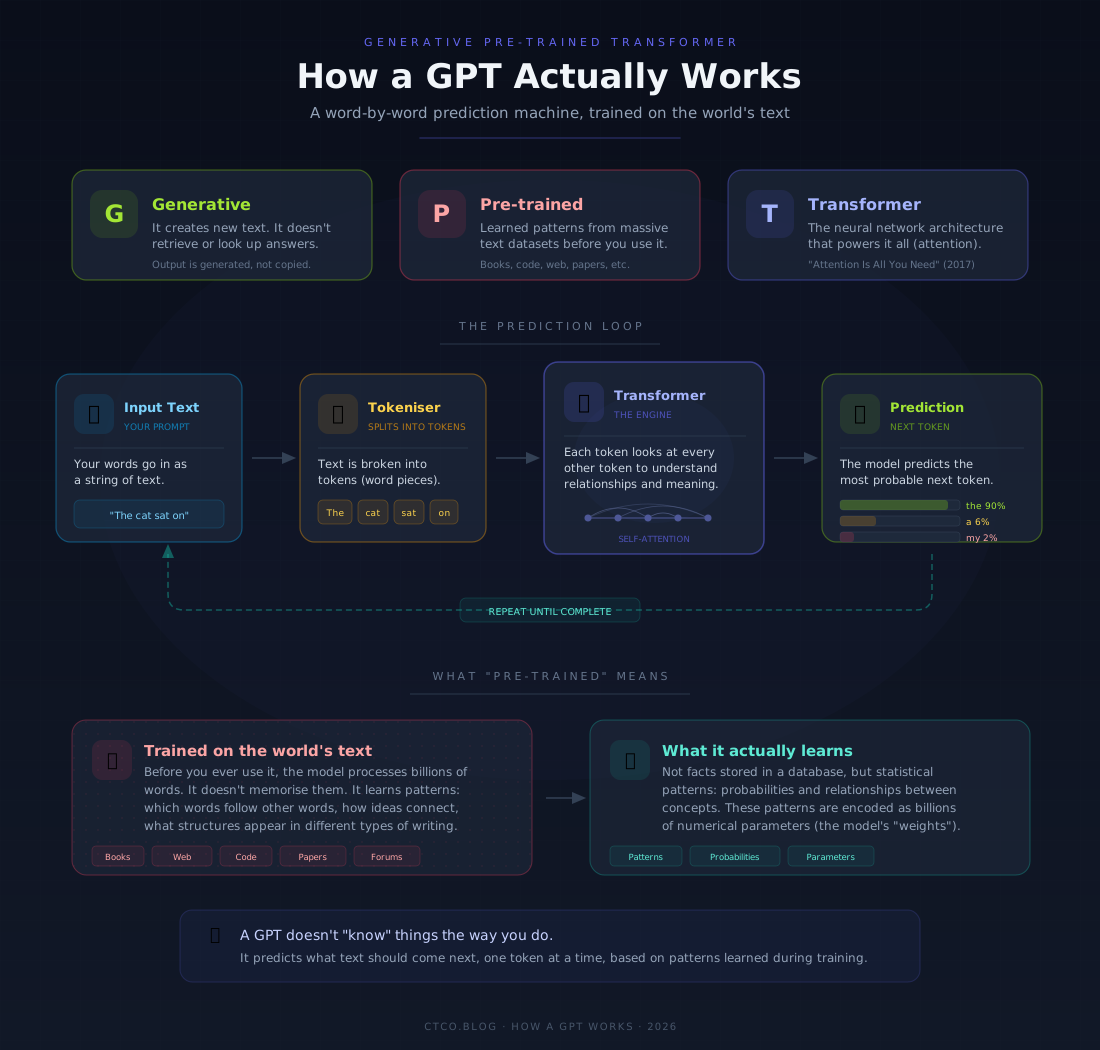
A large language model (an LLM) is, at its core, a prediction machine. That’s it. When you type a prompt into ChatGPT or Claude or Gemini (or Grok if you wish), the model is doing one thing: predicting the most likely next word (or, more precisely, the next token) based on everything that came before it. Then it predicts the next one after that. And the next. Over and over again, incredibly fast, until it’s generated a full response.
This sounds deceptively simple, and honestly, the concept is simple. The execution is where it gets kind of wild.
These models are built on a neural network architecture called the Transformer, introduced in a now-famous 2017 paper called “Attention Is All You Need.” The key innovation was something called the attention mechanism, which lets the model weigh the importance of different words in a sentence relative to each other. So when you write “The bank by the river was covered in moss,” the model learns that “bank” here means the edge of a river, not a financial institution. It figures this out from context, using patterns learned during training.
Training is the big bit. During training, a model processes enormous quantities of text: books, websites, academic papers, code repositories, forum discussions, you name it. Through this process, it builds up a statistical understanding of language: which words tend to follow other words, how concepts relate to each other, what patterns show up in different types of writing. It doesn’t “memorise” this text the way a database stores records. It learns patterns. Probabilities. Relationships between ideas.
Here’s an analogy I keep coming back to. Imagine you read every cookbook ever published. You wouldn’t memorise every recipe word for word, but you’d develop an intuition for how recipes work — that if a recipe starts with sautéing onions, garlic probably comes next. You’d recognise patterns across cuisines. You’d know that a cake needs flour and a raising agent, even if you couldn’t cite the exact page. That’s roughly what an LLM does with language, except at a staggering scale.
The result is a system that can generate text that’s coherent, contextually appropriate, and often surprisingly insightful. But, and this is important, it’s not “thinking.” It’s not reasoning from first principles the way a human does. It’s pattern matching at a very, very sophisticated level. Understanding this distinction matters when you’re deciding what to trust these models with.
What Makes One Model Different from Another?
You’ve probably noticed that not all models are created equal. GPT-4o feels different from Claude Opus, which feels different from Gemini, which feels different from Llama running locally on your machine. Why?
The answer comes down to a few things, but the biggest one is the training data. An LLM’s foundational knowledge (everything it “knows”) is a direct product of what it was trained on. Think of it like education. Two people can go through the same university system, but if one studied English literature and the other studied aerospace engineering, they’ll have very different knowledge bases. Same architecture, different inputs.
Some models are trained with a heavy emphasis on code. Others lean into multilingual text. Some have been exposed to more recent data, while others have a knowledge cutoff that means they genuinely don’t know about events after a certain date unless you give them a way to look things up (more on that shortly). The composition of the training set shapes what the model is good at, what it struggles with, and where its blind spots are.
Beyond the training data, there’s also the model’s size, measured in parameters. Parameters are the internal dials the model adjusts during training to improve its predictions. More parameters generally means a more capable model, but it also means more compute, more cost, and more latency. This is why you see model families with different tiers. Claude has Haiku, Sonnet, and Opus, for example. Haiku is lighter and faster; Opus is the heavyweight. You pick the one that matches your task.
Then there’s fine-tuning and alignment. After the base model is trained, most providers put it through additional rounds of training focused on making it more helpful, safer, and better at following instructions. Anthropic uses a technique they call Constitutional AI for Claude. OpenAI uses reinforcement learning from human feedback (RLHF). These alignment processes are why the same base architecture can produce models with very different “personalities” and behaviours.
So when someone says “just use AI” without specifying which model — that’s a bit like saying “just take medicine” without specifying which one. The choice of model matters, and it should be informed by what you’re actually trying to accomplish.
The Context Window — Your Conversation’s Short-Term Memory
Now we need to talk about the context window, because it’s fundamental to understanding how LLMs work in practice and why prompt engineering actually makes a difference.
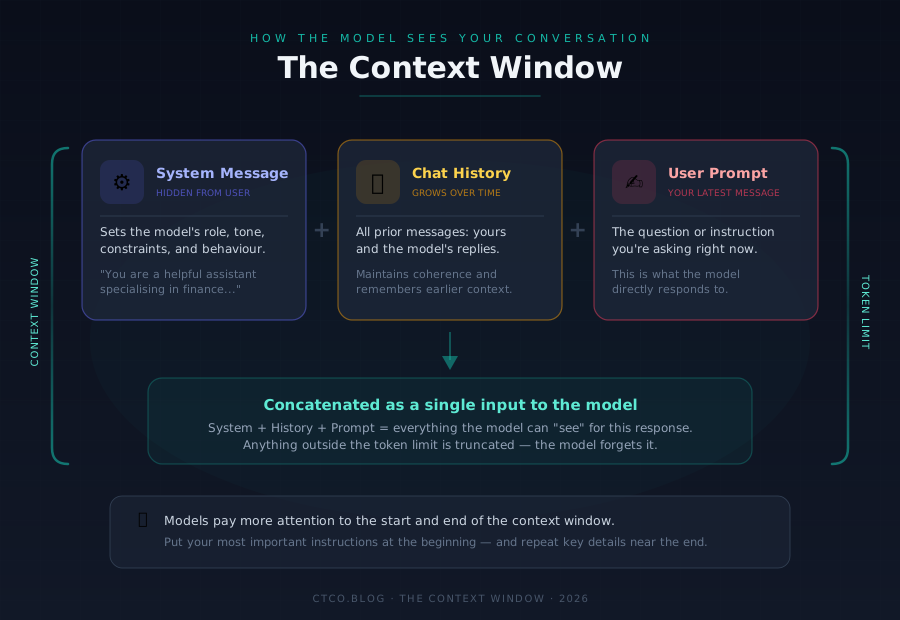
The context window is, put simply, the model’s working memory for a given conversation. It’s the total amount of text the model can “see” and consider when generating a response. Everything outside this window might as well not exist. The model has no access to it.
The context window is made up of three components:
The System Message sits at the very beginning, usually hidden from you as a user. It’s a set of instructions that tells the model how to behave: its role, its constraints, its personality. When you use Claude on claude.ai, there’s a system message in the background saying something along the lines of “You are Claude, a helpful AI assistant made by Anthropic.” When developers build applications on top of these models, they write custom system messages to shape the model’s behaviour for their specific use case. This is actually one of the most powerful levers you have as a builder.
The Conversation History is everything that’s been said so far: your messages and the model’s replies, going back and forth. The model uses this history to maintain coherence. It’s why Claude can remember that you mentioned your project is in Python three messages ago and adjust its code suggestions accordingly.
The User Prompt is your latest message. The thing you’re asking right now.
All three of these get concatenated together and fed into the model as a single block of text. The model then generates a response based on that entire block. This is why earlier parts of a long conversation can start to feel like they’ve been “forgotten”. If the conversation exceeds the token limit of the context window, older messages get truncated. The model literally can’t see them anymore.
Token limits have expanded significantly over the past year or so. Claude’s context window can handle 200,000 tokens, which is roughly equivalent to a 500-page book. GPT-4o and Gemini have pushed into similar territory (With some even hitting the 1 million token mark). This is a big deal, because it means you can feed entire documents, codebases, or lengthy conversation histories into the model and it can work with all of it at once.
But here’s the nuance: just because a model can handle 200k+ tokens doesn’t mean it handles all of them equally well. Research has consistently shown that models tend to pay more attention to the beginning and end of the context window, with a slight dip in attention for material in the middle, sometimes called the “lost in the middle” phenomenon. So if you’re stuffing a massive document into the context, the placement of your most important information matters.
This is, incidentally, where prompt engineering stops being a novelty skill and starts being genuinely important. How you structure what goes into that context window (how you prime the model, how you organise information, where you put your key instructions) directly affects the quality of what comes out.
RAG: Giving the Model a Library Card
Here’s a problem: LLMs have a knowledge cutoff. They only know what they were trained on. If you ask a model about something that happened last week, or about your company’s internal documentation, or about a PDF you uploaded to SharePoint yesterday — it doesn’t have that information baked in. It can’t access it just by being clever.
This is where Retrieval-Augmented Generation, or RAG, comes in.
RAG is a pattern (not a single product or tool) that lets you give a model access to external information at the time of generating a response. The basic idea is straightforward: before the model generates its answer, the system first retrieves relevant information from an external source and injects that information into the context window alongside your prompt. The model then generates its response using both its built-in knowledge and the freshly retrieved material.
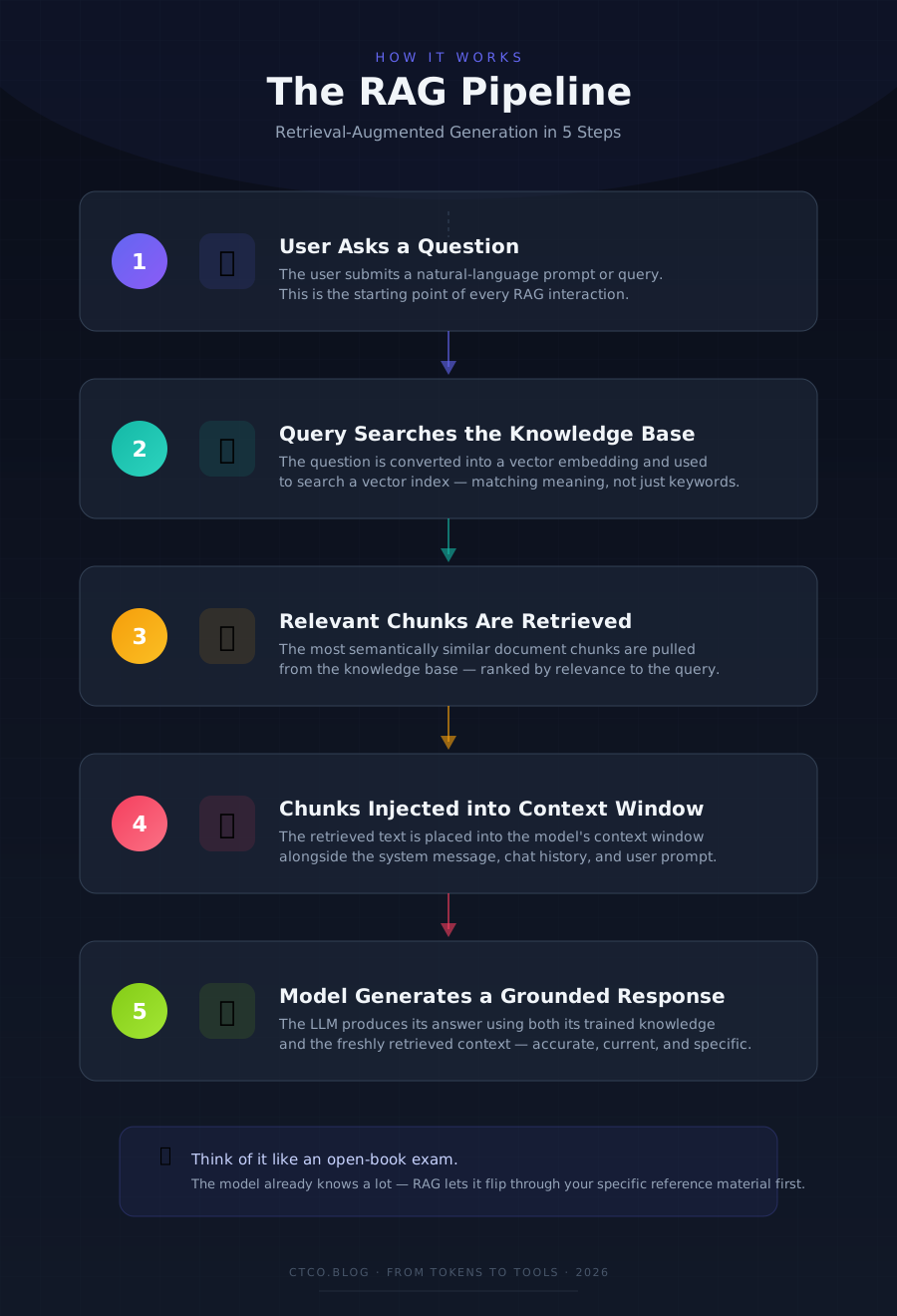
Think of it like an open-book exam. The model already knows a lot from its training (the studied material), but RAG lets it flip through specific reference documents right before answering a question. The result is more accurate, more current, and more grounded in your specific data.
A typical RAG pipeline works something like this:
- You ask a question.
- The system takes your question and searches a knowledge base (this could be a document store, a database, a wiki, anything).
- The most relevant chunks of text are retrieved from that knowledge base.
- Those chunks are inserted into the context window, usually just before your question.
- The model generates a response that draws on both its training and the retrieved context.
The beauty of RAG is that it lets you keep the model’s foundational capabilities while extending its knowledge to include your proprietary information, current events, or domain-specific data, all without having to retrain the entire model. Retraining is expensive, slow, and often impractical. RAG gives you most of the benefit at a fraction of the cost.
That said, RAG isn’t magic. The quality of your RAG system depends heavily on the quality of your retrieval. If the system retrieves irrelevant documents, the model will generate responses based on irrelevant context. Confidently and fluently, which actually makes it worse. Bad retrieval leads to convincing but wrong answers, and that’s a real risk in production systems. This is why the retrieval component of RAG deserves serious engineering attention, which brings us to vector indexes.
Vector Indexes — The Engine Room Behind RAG
If RAG is the pattern, vector indexes are the machinery that makes the retrieval step actually work well.
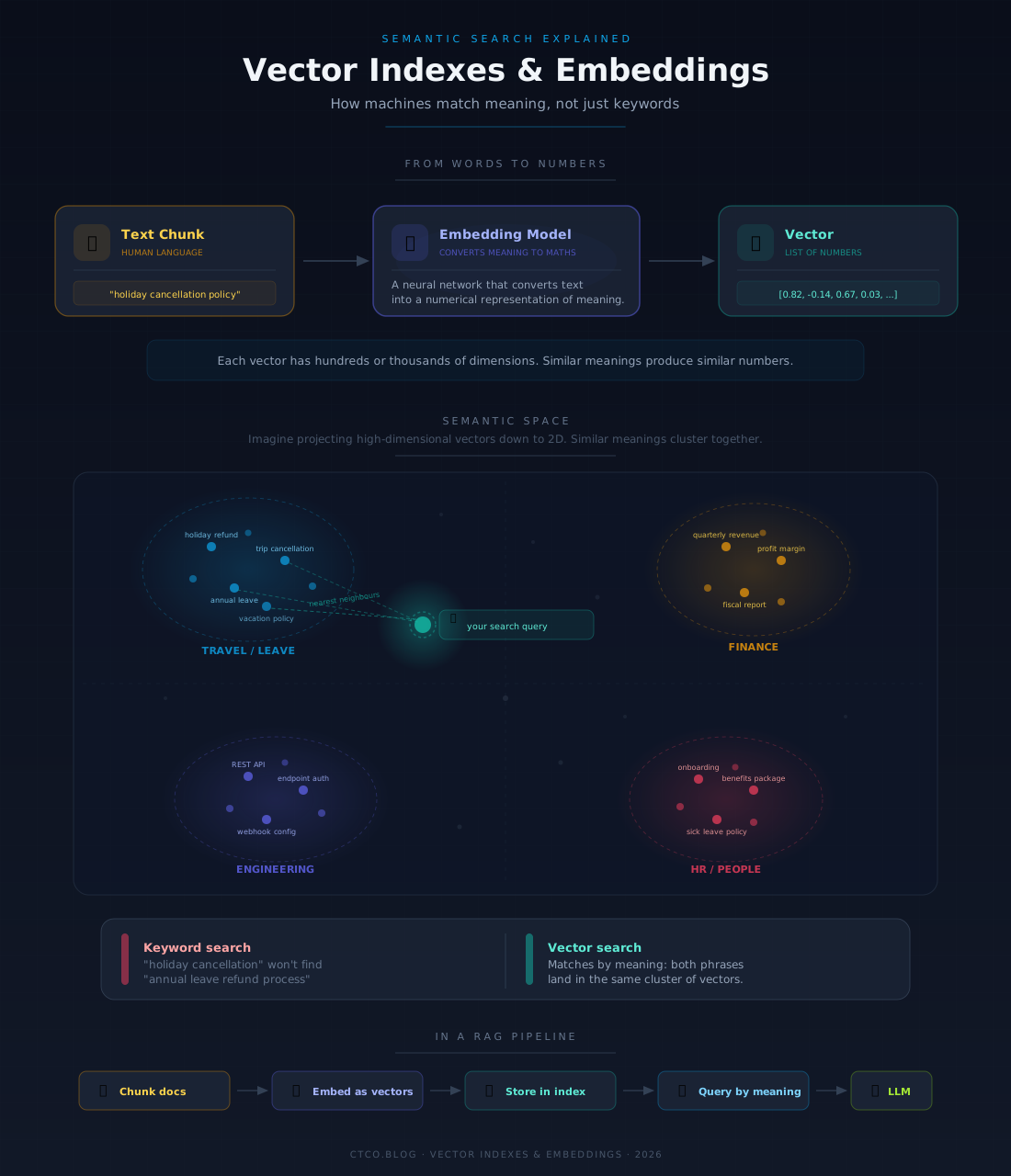
Traditional search is keyword-based. You type “holiday cancellation policy” and the system looks for documents containing those exact words. This works, but it’s brittle. What if your document says “annual leave refund process” instead? Same concept, different words. A keyword search misses it entirely.
Vector search works differently. Instead of matching keywords, it matches meaning.
Here’s how. Every piece of text, whether it’s a sentence, a paragraph, or an entire document, can be converted into a vector: a list of numbers that represents the semantic meaning of that text in a high-dimensional mathematical space. This conversion is done by an embedding model, which is itself a type of neural network trained to understand language. Two pieces of text that mean similar things will have vectors that are close together in this space, even if they use completely different words.
So “holiday cancellation policy” and “annual leave refund process” would end up as vectors that are very near each other, because their meaning is similar. When you run a query through a vector search, you’re asking: “Find me the chunks of text whose meaning is closest to what I’m asking about.”
A vector index (or vector database) is simply a database optimised for storing and searching these vectors efficiently. Products like Pinecone, Weaviate, Qdrant, Chroma, Azure AI Search, and pgvector (for Postgres) all serve this purpose. They let you index millions of document chunks as vectors and search them in milliseconds.
In a RAG pipeline, the flow looks like this:
- Your documents are split into chunks (paragraphs, sections, or pages).
- Each chunk is passed through an embedding model to generate a vector.
- These vectors are stored in a vector index.
- When a user asks a question, that question is also converted to a vector.
- The vector index finds the chunks whose vectors are closest to the question vector.
- Those chunks are fed into the LLM’s context window as retrieved context.
The quality of this process depends on several things: the embedding model you use, how you chunk your documents (too big and you lose precision; too small and you lose context), and how you handle edge cases like tables, images, or documents that don’t split neatly into paragraphs.
There’s also the question of hybrid search: combining vector search with traditional keyword search to get the advantages of both. Most production RAG systems use some form of hybrid approach, because there are cases where exact keyword matches matter (part numbers, legal clause references, proper nouns) and cases where semantic similarity matters more.
If you’re an engineering leader thinking about implementing RAG in your organisation, the vector index is where much of the complexity and the competitive advantage lives. Getting it right is the difference between a chatbot that impresses in demos and one that actually works in production.
MCP: The Evolution Beyond RAG
Right, so we’ve established that RAG lets a model retrieve and read information from external sources. That’s powerful. But it’s also, fundamentally, a one-way street. The model reads. It doesn’t act.
What if you want the model to not just read a document, but create one? Not just look up a calendar entry, but book a meeting? Not just query a database, but write back to it? This is where the Model Context Protocol (MCP) enters the picture.
MCP was introduced by Anthropic in November 2024 as an open standard for connecting AI systems to external tools and data sources. If RAG gives the model a library card, MCP gives it a set of keys to the building.
The problem MCP solves is often described as the N×M integration problem. Before MCP, if you wanted your AI application to work with ten different tools (Google Drive, Slack, a CRM, a database, GitHub) you’d need to build a custom integration for each one. And if you wanted to swap out the underlying model, you’d potentially need to rebuild those integrations. Ten tools times three model providers equals thirty custom connectors. That doesn’t scale.
MCP provides a standardised protocol. Think of it like USB for AI integrations. Instead of building custom connectors, tool providers build an MCP server that describes their capabilities in a standard format. AI applications (the MCP clients) can then discover and use those tools without bespoke code. One protocol, many tools, any model.
The architecture is a client-server model built on JSON-RPC 2.0. An MCP server exposes three main types of capabilities:
- Tools — functions the model can call (e.g., “create a task in Asana,” “send an email,” “query a database”).
- Resources — data the model can read (e.g., files, database records, API responses).
- Prompts — pre-built prompt templates that guide the model for specific tasks.
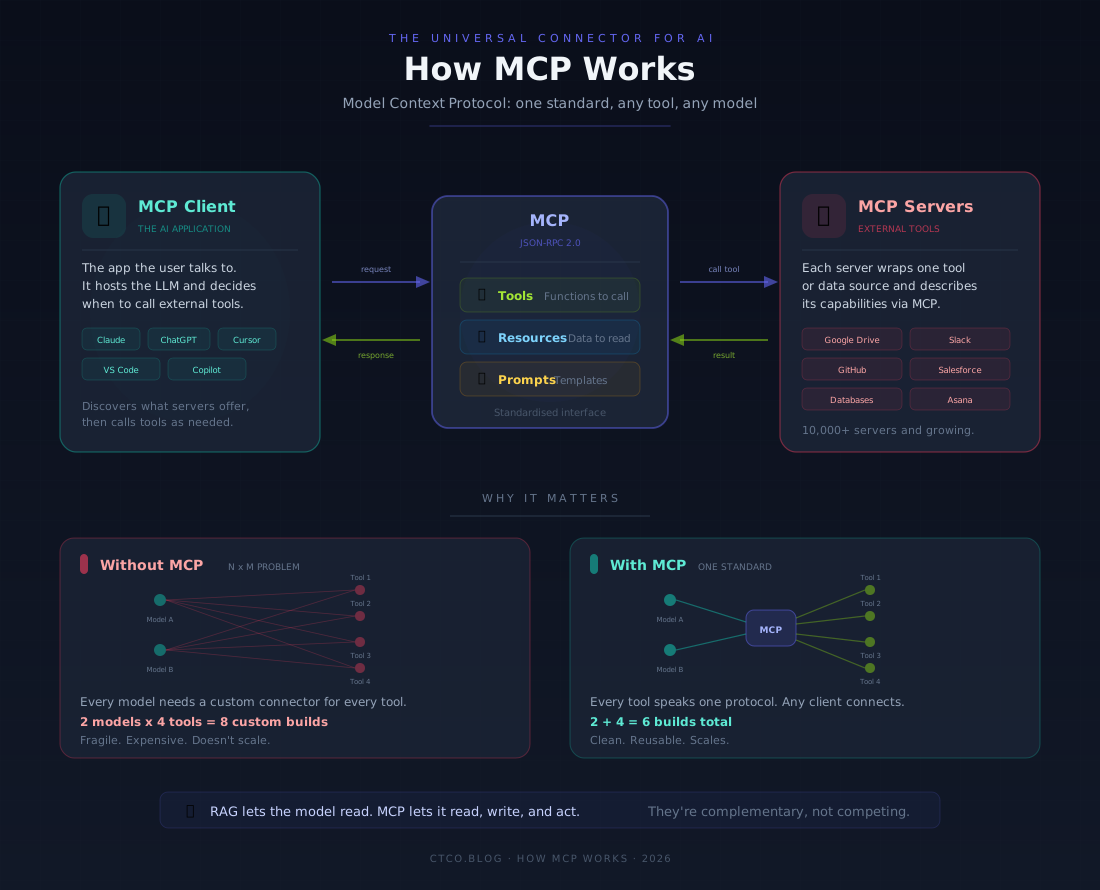
When an AI application connects to an MCP server, it discovers what’s available (what tools exist, what data can be accessed, what prompts are offered) and can then use those capabilities as part of a conversation. The model decides when to call a tool based on the user’s request, executes the call through the MCP server, gets the result back, and incorporates it into its response.
This is a significant shift. RAG is essentially read-only — retrieve information, stuff it into context, generate. MCP is bidirectional. The model can read and write. It can retrieve and act. It can maintain state across interactions, coordinate across multiple systems, and execute multi-step workflows.
The adoption has been remarkable. Within its first year, MCP was picked up by OpenAI, Google DeepMind, Microsoft, and a growing ecosystem of tool providers. In December 2025, Anthropic donated the protocol to the Agentic AI Foundation under the Linux Foundation, with OpenAI and Block as co-founders. As of early 2026, there are over 10,000 active MCP servers and tens of millions of monthly SDK downloads. It’s become, for all practical purposes, the standard.
Now, it’s worth being clear about something: MCP doesn’t replace RAG. They solve different problems. RAG is about knowledge retrieval: giving the model access to information it doesn’t have. MCP is about integration and action: giving the model the ability to interact with external systems. Sophisticated AI systems use both: RAG for knowledge enrichment, MCP for orchestration. Think of them as complementary layers in the same stack.
The security conversation around MCP is also maturing, which matters if you’re in a leadership role evaluating this technology. Early deployments surfaced real concerns around prompt injection, tool permissions, and data exfiltration. The 2026 roadmap is focused heavily on enterprise readiness: audit trails, SSO-integrated authentication, gateway behaviour, and configuration portability. It’s still early days for some of this, and if your organisation handles sensitive data, you’ll want to evaluate MCP deployments carefully. But the trajectory is clear.
Bringing It All Together — Conversational AI in Practice
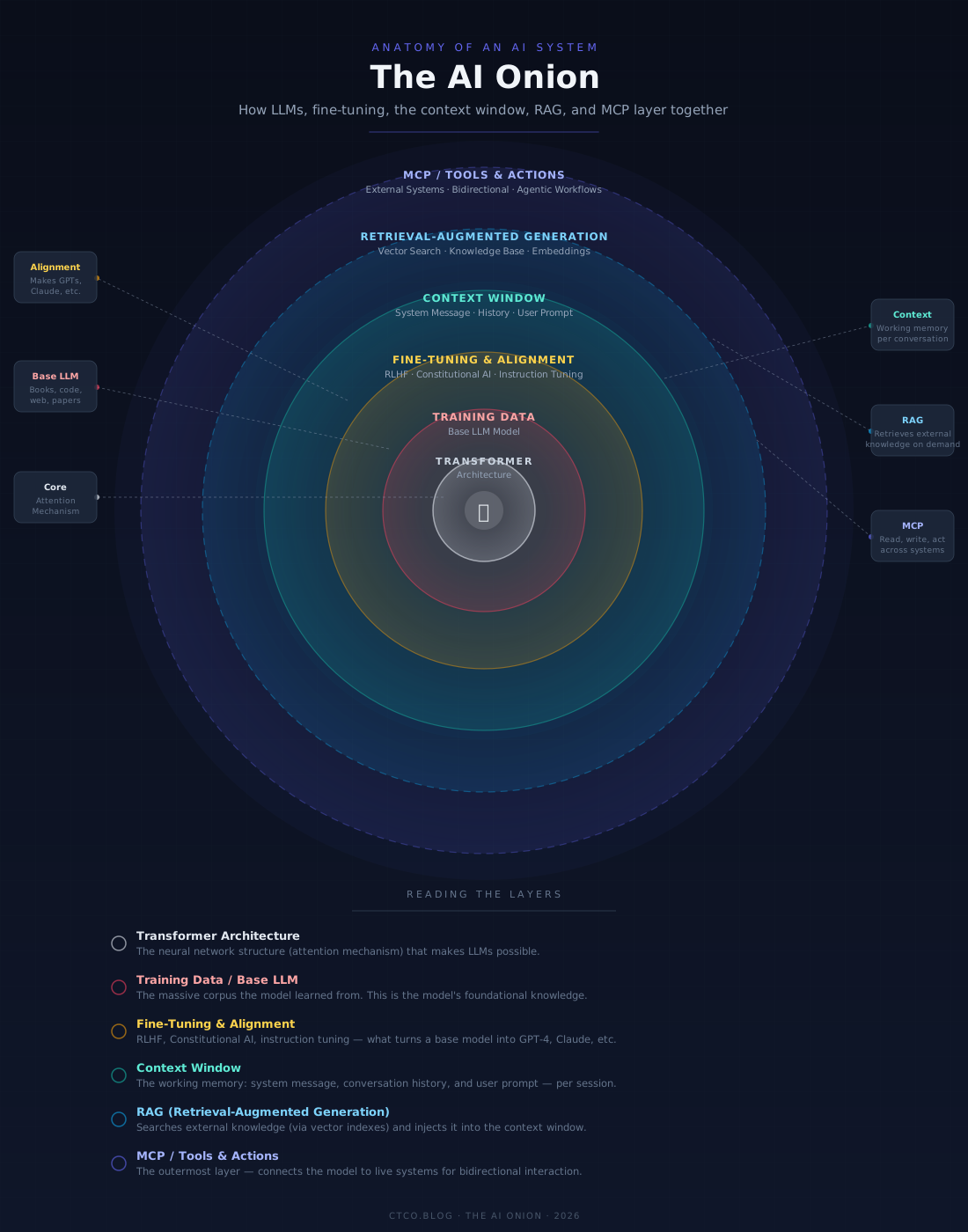
So let’s step back and look at the full picture, because all of these pieces connect.
At the foundation, you have the LLM itself, a massive prediction engine trained on a broad corpus of text, capable of generating coherent, contextual language. This is your base capability.
Sitting around the model is the context window, the working memory for any given interaction. Everything the model knows about your current conversation (the system instructions, the chat history, your latest prompt) lives here. How you structure what goes into this window is the essence of prompt engineering.
Extending the model’s knowledge beyond its training data, you have RAG, a retrieval pipeline that searches external sources (powered by vector indexes for semantic search) and injects relevant information into the context window before the model generates a response.
And connecting the model to the broader world of tools and systems, you have MCP, a standardised protocol that lets the model not just read information, but discover capabilities, call functions, and take actions across your technology ecosystem.
When these layers work together, you get something that’s genuinely powerful: an AI system that can understand your question, pull in relevant knowledge from your company’s documents, check a live system for current data, take an action on your behalf, and explain what it did, all in a single conversational interaction.
This is what people mean when they talk about “agentic AI.” It’s not a single product. It’s a stack, a set of capabilities layered together, and each layer has its own engineering considerations, trade-offs, and failure modes.
Thinking About Your Use Case
Here’s where I want to shift from the technical to the practical, because understanding the technology is only half the battle. The other half is knowing how to apply it.
I talk to a lot of people (engineers, product managers, CTOs, directors) who are somewhere on the spectrum between “we need to do something with AI” and “we’ve been doing things with AI but they’re not quite landing.” In most cases, the gap isn’t technical capability. It’s strategic clarity.
Before you worry about which model to use or whether you need RAG or MCP, ask yourself some foundational questions:
What problem am I actually solving? Not “how can we use AI?” but “what specific pain point, bottleneck, or opportunity are we addressing?” AI is a means, not an end. If you can’t articulate the problem clearly, the solution won’t be clear either.
What data does the AI need to do this well? If the answer is “our internal documentation” or “real-time system data,” you’re looking at a RAG or MCP implementation. If the answer is “general knowledge,” a well-prompted base model might be enough.
What should the AI be able to do, and what should it not? This is about boundaries. Can it read data but not write it? Can it suggest actions but not execute them? Can it access customer records? The answers to these questions determine your architecture and your risk profile.
Who is the user? A developer using an AI-assisted coding tool has very different needs from a sales rep using an AI assistant to draft proposals, which is different again from a customer interacting with a support chatbot. The same underlying technology, configured and prompted differently.
Let me sketch a few scenarios to make this concrete:
For a Strategy or Leadership context, you might use a capable model like Claude Opus or GPT-5.3 with a well-crafted system prompt that establishes the model as a strategic advisor. You’d provide relevant documents (market research, internal reports, financial data) either through the context window directly or via RAG. The key prompt engineering principle here is framing: give the model a clear role, a clear objective, and the relevant context. Be explicit about what kind of analysis you want, and be honest about what the model can’t do (like predict the future with certainty).
For a Software Engineering context, you’re probably looking at a model integrated into your development environment — something like Claude Code, GitHub Copilot, or Cursor. MCP becomes relevant here because the model needs access to your codebase, your issue tracker, your documentation, and potentially your CI/CD pipeline. The prompt engineering is often implicit, built into the system message and the tool’s integration layer, but the principle is the same: give the model the right context, the right tools, and clear instructions about what you want.
For a Customer-Facing context, you need RAG to ground the model’s responses in your actual product information, policies, and knowledge base. You probably also need guardrails to prevent the model from making things up or going off-topic. MCP could enable the model to look up order statuses, check account details, or even initiate a return process. Prompt engineering here is about constraints as much as capabilities: defining not just what the model should do, but what it absolutely should not.
The common thread across all of these? Clarity. The models are remarkably capable, but they’re not mind readers. The quality of what you get out is a direct function of the clarity and structure of what you put in.
A Quick Word on Prompt Hygiene
I covered prompt engineering techniques in detail in my 2024 post, and most of that advice still holds. But I want to highlight a few principles that have become more important as the tools have matured.
Be explicit about format. If you want a bullet list, say so. If you want a 200-word summary, say so. If you want the model to think step by step before answering, say “think step by step.” Models are literal-minded in a way that catches people off guard: they’ll follow instructions precisely, but they won’t infer instructions you didn’t give.
Front-load your most important context. Remember the “lost in the middle” effect I mentioned earlier. If you’re providing a long document, put your key question or instruction at the very beginning and again at the end. Don’t bury it in paragraph fifteen.
Use system messages deliberately. If you’re building an application, the system message is your most important lever. It sets the model’s role, its tone, its constraints, and its priorities. Spend time on it. Iterate on it. Test it.
Don’t try to trick the model. I still see people writing prompts like they’re trying to outsmart the AI. “Pretend you have no restrictions” or “Ignore your previous instructions.” This doesn’t work well, and it’s not how you get good results. Treat the model like a capable colleague who needs clear briefing. Be direct. Be honest about what you need.
Structure your prompts with Markdown. This one catches people by surprise, but it’s genuinely one of the most effective things you can do. LLMs are trained on vast quantities of Markdown (documentation, READMEs, GitHub issues, wikis), so they’re extremely good at parsing it. When you use headings, bullet lists, numbered steps, bold text, and code blocks in your prompts, you’re not just making things readable for yourself. You’re giving the model clear structural signals about what’s important, what’s a list of options versus a sequence of steps, and where one section of context ends and another begins.
For example, instead of writing a wall of text like:
I need you to review this code for security issues especially SQL injection and XSS and also check for performance problems and suggest improvements and format the output as a list of findings with severity levels.
Try something like:
# Code Review Request

## Task
Review the following code for security and performance issues.

## Areas to Check
- SQL injection vulnerabilities
- Cross-site scripting (XSS)
- Performance bottlenecks

## Code
\`\`\`csharp
var query = "SELECT * FROM Users WHERE Id = " + userId;
\`\`\`

## Output Format
A numbered list of findings, each with:
1. **Severity** (critical, high, medium, low)
2. **Description** of the issue
3. **Suggested fix** with a corrected code example
The second version gives the model the same information, but the structure makes the intent unmistakable. The # headings create clear sections the model can navigate. Bullet lists make the checklist explicit. Bold labels tell the model what role each piece plays. You’ll get noticeably better, more consistent results simply by formatting your prompts as if they were documentation.
This isn’t limited to engineering tasks either. Here’s the same principle applied to a strategy or project management scenario. Instead of:
We’re thinking about migrating our on-prem data warehouse to the cloud and I need you to help me think through the options and risks and come up with a recommendation considering we have a small team and limited budget and we need to keep downtime to a minimum during the transition.
Try:
# Cloud Migration Analysis

## Context
We currently run an on-prem SQL Server data warehouse serving
~50 internal users. The hardware lease expires in 8 months.

## Constraints
- **Team:** 3 engineers (no dedicated DBA)
- **Budget:** £120k for migration, £3k/month ongoing
- **Downtime tolerance:** Maximum 4 hours during cutover
- **Compliance:** UK data residency required (GDPR)

## What I Need
1. A comparison of **2-3 viable cloud options**
   (e.g. Azure SQL, AWS RDS, Google Cloud SQL) in a table
   covering cost, migration complexity, and managed services
2. **Key risks** for each option, ranked by likelihood
3. A **recommended option** with reasoning
4. A high-level **migration timeline** in phases
Same information, but now the model knows exactly what “small team” means, what the budget actually is, and what shape you want the answer in. The constraints section alone eliminates a huge amount of guesswork. You’d be surprised how often prompts fail not because the model isn’t capable, but because it’s filling in blanks you left open.
If you’re not familiar with Markdown syntax, GitHub has an excellent guide to basic formatting that covers headings, lists, bold/italic text, code blocks, and more. It’s worth bookmarking.
This applies equally to system messages in applications. If you’re writing a system prompt for a production AI feature, treat it like a well-structured specification: use Markdown headings, keep sections focused, and use lists for rules and constraints. The model will follow structured instructions far more reliably than it’ll follow a paragraph of prose with the same information buried inside it.
Iterate. The first prompt you write is rarely the best one. Try it, evaluate the output, adjust, try again. Prompt engineering is an iterative process, closer to tuning a recipe than writing a specification.
Where Do We Go from Here?
The pace of change in this space is, frankly, relentless. In the eighteen months since I wrote the original post, we’ve gone from “chat with a language model” to “language models that can browse the web, execute code, query databases, file pull requests, and coordinate multi-step workflows across enterprise systems.” The technology is moving fast. The standards (like MCP) are maturing. The ecosystem is growing.
But I think the most important shift isn’t technical: it’s cultural. We’re moving from a world where AI is a novelty that people experiment with on the side, to one where it’s an infrastructure layer that organisations need to think about deliberately. That means treating it with the same rigour you’d apply to any other technology decision: clear requirements, proper evaluation, thoughtful architecture, and ongoing governance.
If you’re in a leadership role, my honest advice is this: don’t chase the hype, but don’t ignore it either. Invest in understanding these fundamentals (how LLMs work, what RAG and MCP enable, where the limitations are) so you can make informed decisions rather than reactive ones. The organisations that will get the most value from AI aren’t necessarily the ones who adopt fastest. They’re the ones who adopt thoughtfully.
And if you’re an engineer or a practitioner, learn the stack. Understand the context window. Build a RAG pipeline. Experiment with MCP servers. Write good prompts. These aren’t esoteric skills — they’re becoming as fundamental as knowing how to work with an API or write a SQL query.
The tools are here. The question is what you build with them.

