
Table of contents
Open Table of contents
- Introduction
- What we’re optimising for
- Core principles
- Reference architecture
- Workload mapping
- Achieving scale-to-zero (practical configuration)
- Data and storage patterns
- Security baseline
- Payment and wallet model
- Deployment and environments
- Ops and residency
- Cost control checklist
- Honest trade-offs
- Architecture diagrams
- Next steps
- Summary
Introduction
If you’re building a SaaS product as an individual contributor then you’ll almost certainly have had the same thoughts that I had, how do I keep capital investment as low as possible. You will have thought that, as the capital investment is your own money, so every bit counts. At the same time, if you have experience of the software delivery life-cycle you know that its generally a good idea to have something that still acts production-grade; a solution that won’t fall over the moment traffic arrives.
This blog post, part of the “Playbooks” series, walks through a scale-to-zero architecture on Azure. One that can idle at near-zero cost while maintaining a clean path to “real SaaS” with authentication, payments, async jobs, observability, and sensible security defaults.
I’ll use a reference architecture I’ve called “SaaS-Light” throughout, but the design considerations apply to most early-stage SaaS products where cost control is critical.
What you’ll learn
- How to structure compute, data, and background processing for genuine scale-to-zero
- Practical configuration knobs in Azure Container Apps and Azure Functions
- Data tier patterns that minimise idle chatter
- Security defaults that don’t require a dedicated security team
- Honest trade-offs you’ll need to accept
Prerequisites
Before diving in, you should be comfortable with:
- Azure fundamentals (resource groups, subscriptions, managed identity)
- Containerised applications (Docker basics)
- At least one backend framework (ASP.NET Core, Node.js, etc.)
- Basic understanding of queues and async processing
What we’re optimising for
Let’s be explicit about the goals; these shape every decision downstream.
Primary goal: Near-zero idle cost while keeping a clean path to production-grade SaaS (auth, payments, async jobs, observability, security).
Secondary goals:
- Predictable operations
- Minimal moving parts
- Regional data residency (more on this in the Ops section)
- Developer ergonomics
Defining “scale to zero” (pragmatically)
Let’s be honest about what “scale to zero” actually means in practice:
| Layer | Can it hit zero? | Reality check |
|---|---|---|
| Compute | Yes | Container Apps and Functions can scale to 0 replicas |
| Background processing | Yes | Event-driven/queued, runs only when needed |
| Data tier | Mostly | Serverless SQL can pause, but constant pokes keep it awake |
| Edge/CDN | No | DNS, WAF, caching, always incurs baseline cost |
| Monitoring | No | Application Insights has minimum ingestion costs |
| Storage | No | Blob storage charges for existence, not just access |
The goal isn’t literally zero; it’s near-zero with a clear understanding of what’s irreducible.
Core principles
These five principles form the “rules of the game” for this architecture:
1. Separate request/response from long work
Your web/API layer should handle fast work only. Anything that takes more than a couple of seconds becomes a job; I’d typically say queue it, process it asynchronously, update status.
❌ User clicks "Refresh Prices" → API blocks for 30 seconds → Returns result
✅ User clicks "Refresh Prices" → API enqueues job → Returns immediately → Worker processes → UI polls for status
2. Event-driven everything
Prefer HTTP triggers + queue triggers over always-on schedulers or polling loops. If nothing’s happening, nothing should be running.
3. Cold-start tolerant UX
Cold starts are real. Design for them:
- Keep container images small
- Cache aggressively at the edge (I like Cloudflare’s free plan for this, but more later)
- Show loading states gracefully
- Pre-warm critical paths if needed
4. Cost controls are architecture, not finance
Don’t treat cost management as a finance team problem. Bake it into the architecture:
minReplicas: 0is a design decision- Budgets and alerts are infrastructure
- “Kill switches” for runaway workloads are first-class features
5. Security is default, not a later patch
Managed identity, Key Vault, least privilege, defensive data boundaries, these aren’t “nice to haves” for later. They’re cheaper to build in from day one. So, make sure you think about them, if you’re utilising Agentic AI workflows, make sure to include security reviews in your process.
Reference architecture
Here’s the high-level view of what we’re building:
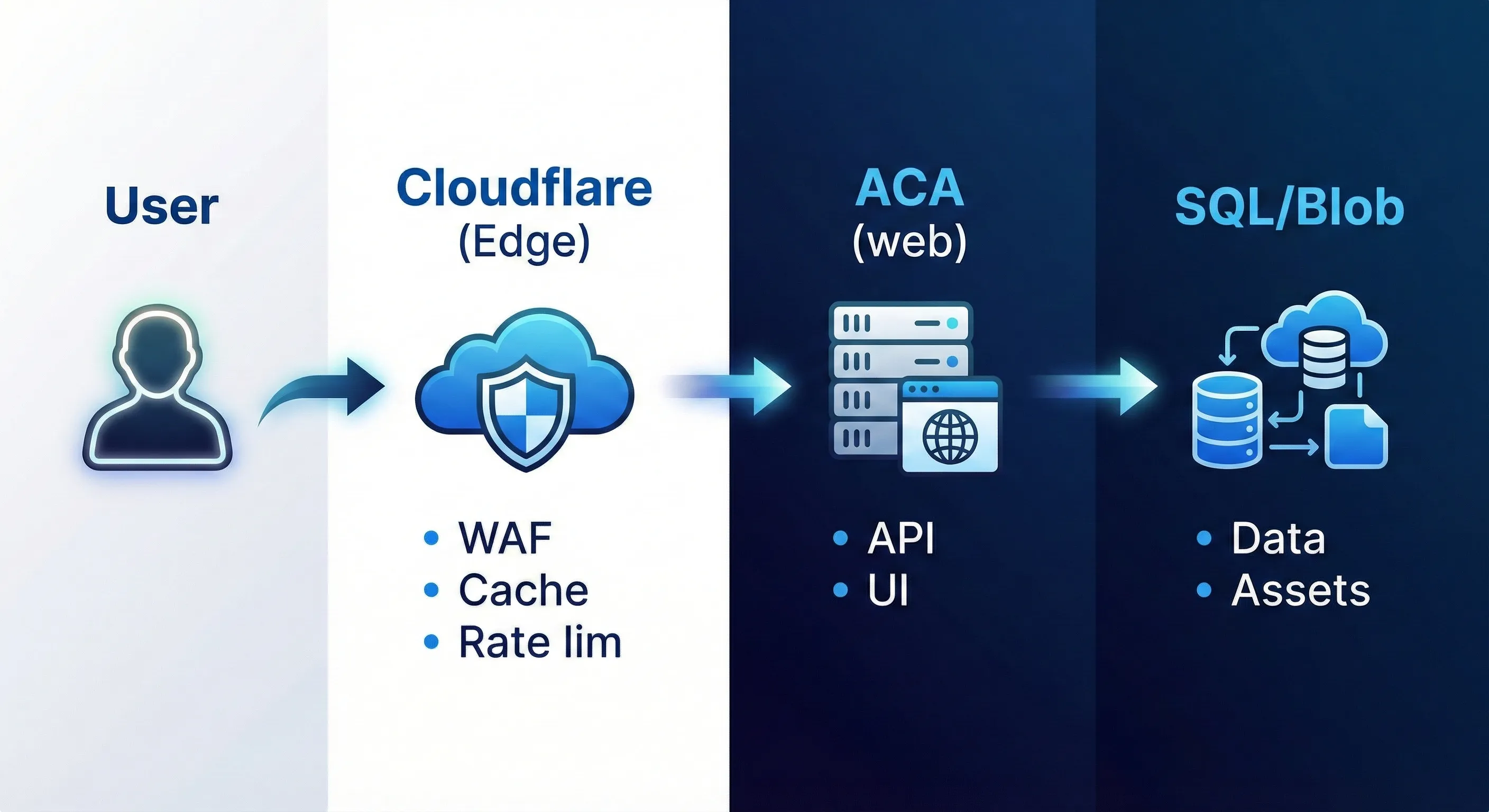
Edge layer
Cloudflare (or equivalent) handles:
- DNS management
- WAF and DDoS protection
- Edge caching and cache rules
- Rate limiting (optional but recommended)
Why Cloudflare? It’s cost-effective, has a generous free tier, and the Workers/Rules ecosystem is mature. Azure Front Door is an alternative if you prefer staying in-ecosystem.
App tier (compute that scales to zero)
Azure Container Apps (ACA) hosts your application containers:
| App | Purpose | Scale rule |
|---|---|---|
web | Customer UI + API (e.g., Blazor Server, ASP.NET Core) | HTTP concurrency, min replicas = 0 |
admin | Internal/admin portal | HTTP concurrency, min replicas = 0 |
Container Apps is the sweet spot here. it’s simpler than Kubernetes, supports scale-to-zero natively, and handles ingress/TLS automatically.
In the above table I’m saying scale to zero for both public and admin apps. You might choose to keep the public app warm if you want to provide a better experience for end users (less cold start impact). The admin app is a great candidate for scale-to-zero since it’s used infrequently (Or at least only by a small number of users).
Async tier (also scales to zero)
Pick one (or mix based on workload):
Azure Functions (Consumption or Flex plan):
- Best for: queue triggers, timer triggers, webhook handlers
- Cold start: typically 1-3 seconds
- Cost: pay per execution
Azure Container Apps Jobs:
- Best for: run-to-completion workloads (batch imports, data migrations)
- Cold start: container pull time (keep images small!)
- Cost: pay for execution duration
Integration and messaging
Azure Storage Queues for most scenarios:
- Dead simple
- Extremely cheap
- Good enough for 90% of async patterns
Azure Service Bus when you need:
- Message sessions (extracting ordered sets of messages)
- Advanced dead-letter handling
- Exactly-once processing guarantees
- Complex routing/topics
Start with Storage Queues. Graduate to Service Bus when you hit its limitations. Please bear in mind that Azure Queue Storage is a lightweight queue and doesn’t provide a FIFO guarantee (ordering is best-effort). If you need guaranteed ordered processing and other broker features, Azure Service Bus can provide FIFO via Sessions (Standard/Premium), but it typically comes at a higher cost than Storage Queues.
Data layer
Azure SQL Database (Serverless tier):
- Auto-pause after configurable idle period
- Auto-resume on first connection
- Pay for vCores only when active
Perfect for: relational domain data (users, collections, subscriptions, pricing metadata).
Azure Blob Storage:
- Images and binary assets
- Serve via CDN for performance
- Lifecycle policies for cost control
What about Redis?
Be honest with yourself: Redis (Azure Cache for Redis) is rarely “scale-to-zero”. The cheapest tier still costs money when idle.
Instead:
- Use app-level caching (in-memory, with short TTL)
- Use edge caching (Cloudflare cache rules)
- Add Redis only when you’ve proven you need distributed cache
Config and secrets
Azure Key Vault:
- Store third-party secrets (payment provider keys, email API keys)
- Access via managed identity (no connection strings in config)
Azure App Configuration:
- Feature flags
- Runtime configuration
- Environment-specific settings
Observability
Application Insights:
- Logs, traces, metrics in one place
- Distributed tracing across services
- Alerting on anomalies
Cost control tips:
- Enable sampling (don’t log 100% of requests)
- Set retention periods appropriately
- Focus on high-signal metrics, not vanity dashboards
Workload mapping
These are some concrete examples that I ran into so Let’s map real SaaS flows to this architecture using the my first SaaS project reference:
Authentication flow
User → Cloudflare → ACA (web) → Azure AD B2C / Entra External ID
                                         ↓
                              Token validation at app edge
Options:
- Azure AD B2C or Entra External ID for customer identity
- Alternative providers (Auth0, Clerk) if you prefer managed auth
The key: token validation happens at your app edge, not deep in your business logic.
Email notifications
App event (sign-up, password reset)
         ↓
    Storage Queue
         ↓
    Azure Function
         ↓
    Email provider API (Resend, Postmark, SendGrid)
Why queue it? Email providers can be slow or rate-limited. Your API shouldn’t block on email delivery.
Read-heavy endpoints (search, collection views)
User → Cloudflare (cache hit?) → ACA (web) → SQL
              ↑                        ↓
         Cache response           Query + cache miss
Cache public/catalog-like data aggressively at the edge. Use Cache-Control headers and Cloudflare cache rules.
Price refresh (the async pattern in detail)
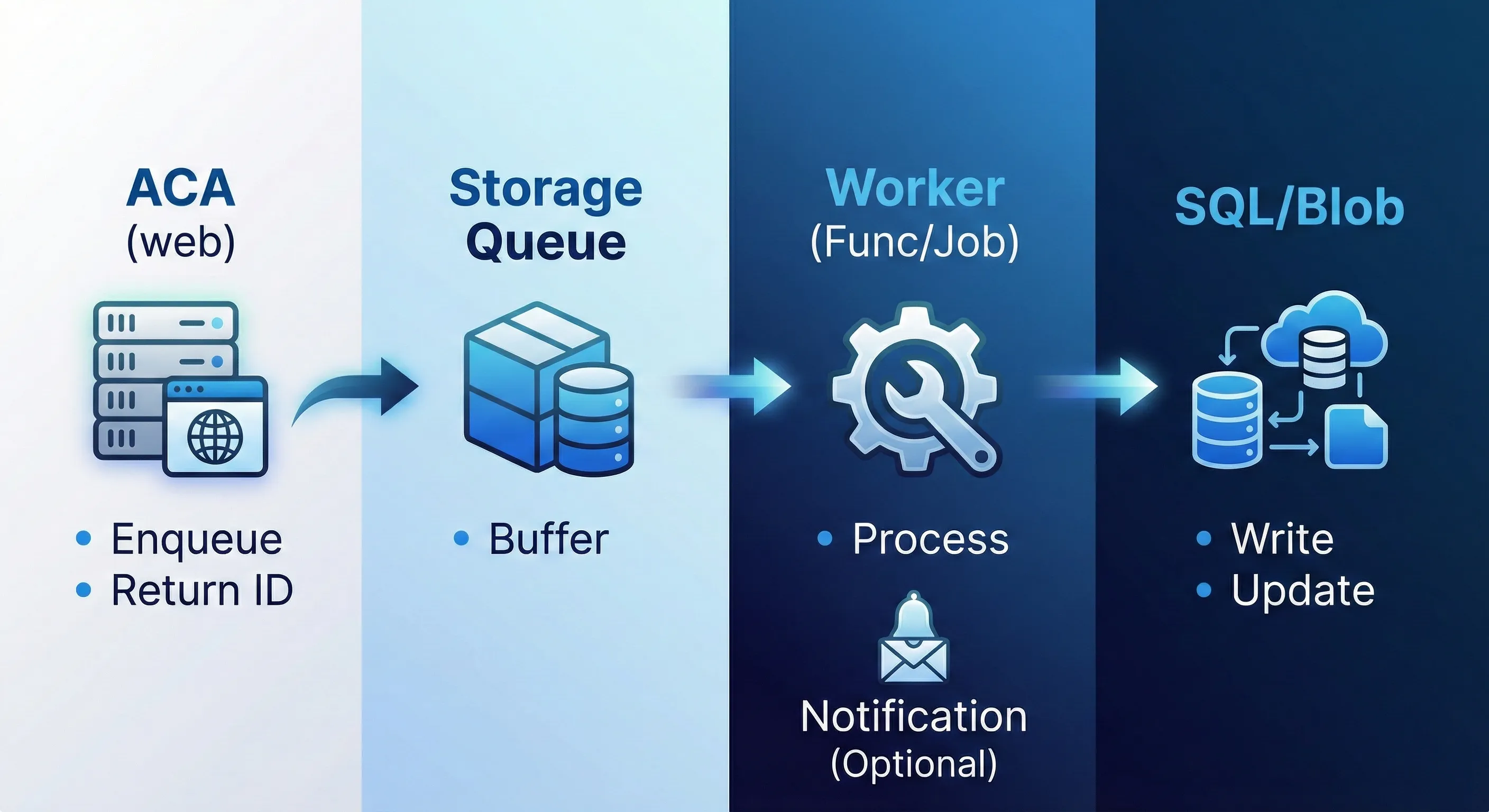
This is the canonical example of “separate fast from slow”:
1. User clicks "Refresh Prices"
2. API validates request, enqueues job, returns job ID immediately
3. Worker picks up job from queue
4. Worker calls external pricing API
5. Worker writes pricing rows to SQL
6. Worker updates job status to "complete"
7. UI polls job status, shows progress, displays results
Key design choice: Price refresh is never synchronous. The user gets immediate feedback, and the actual work happens in the background.
Achieving scale-to-zero (practical configuration)
Here’s where theory meets YAML. Let’s look at the actual knobs (don’t giggle at the phrasing). I should also point out that YAML is not my strong suit.
Azure Container Apps configuration
# Excerpt from ACA deployment
properties:
  configuration:
    ingress:
      external: true
      targetPort: 8080
  template:
    scale:
      minReplicas: 0      # ← This is the magic
      maxReplicas: 10
      rules:
        - name: http-scaling
          http:
            metadata:
              concurrentRequests: "50"
Additional optimisations:
- Keep images small: Use multi-stage builds, distro-less bases
- Health probes: Configure liveness/readiness so ACA knows when you’re ready
- Fast startup: Lazy-load what you can, defer non-critical initialisation
Azure Functions (Consumption plan)
{
  "bindings": [
    {
      "name": "queueItem",
      "type": "queueTrigger",
      "direction": "in",
      "queueName": "price-refresh-jobs",
      "connection": "AzureWebJobsStorage"
    }
  ]
}
The function only runs when there’s work in the queue. No queue messages = no execution = no cost.
Azure SQL Serverless
-- Configure auto-pause (via Azure Portal or ARM/Bicep)
-- Typical settings:
-- Auto-pause delay: 60 minutes
-- Min vCores: 0.5
-- Max vCores: 4
Design your app to minimise SQL chatter:
- Batch reads where possible
- Use projections instead of loading full entities
- Consider read replicas or materialised views for heavy read patterns
Edge caching strategy
Configure Cloudflare (or your edge provider) to cache appropriately:
| Endpoint pattern | Cache strategy |
|---|---|
/api/catalog/* | Cache 1 hour, stale-while-revalidate |
/api/user/* | No cache (private data) |
/static/* | Cache indefinitely (hashed filenames) |
/api/health | No cache |
Use stale-while-revalidate for data that’s okay to be slightly stale. Users get fast responses while the cache refreshes in the background.
Data and storage patterns
SQL schema approach
Even if v1 is effectively single-tenant, design for multi-tenancy from day one:
-- Every significant table includes TenantId
CREATE TABLE Collections (
    Id UNIQUEIDENTIFIER PRIMARY KEY,
    TenantId UNIQUEIDENTIFIER NOT NULL,  -- Ready for multi-tenant
    Name NVARCHAR(200) NOT NULL,
    CreatedAt DATETIME2 NOT NULL,
    -- ...
    INDEX IX_Collections_TenantId (TenantId)
);
This saves painful migrations later.
Pricing history (append-only pattern)
For data that grows over time (price history, audit logs), use append-only tables:
-- Append-only history
CREATE TABLE PriceHistory (
    Id BIGINT IDENTITY PRIMARY KEY,
    CardId UNIQUEIDENTIFIER NOT NULL,
    Price DECIMAL(10,2) NOT NULL,
    Currency CHAR(3) NOT NULL,
    RecordedAt DATETIME2 NOT NULL,
    Source NVARCHAR(50) NOT NULL,
    INDEX IX_PriceHistory_CardId_RecordedAt (CardId, RecordedAt DESC)
);

-- Materialised current price (updated by worker)
CREATE TABLE CurrentPrices (
    CardId UNIQUEIDENTIFIER PRIMARY KEY,
    Price DECIMAL(10,2) NOT NULL,
    Currency CHAR(3) NOT NULL,
    LastUpdated DATETIME2 NOT NULL
);
Query current prices from CurrentPrices (fast, single row per card). Query history from PriceHistory only when needed.
Blob storage for images
Use deterministic, hierarchical paths; the below example is related to TCG card images (Why not):
cards/{setCode}/{cardNumber}/{variant}.jpg

Examples:
cards/ONE/042/normal.jpg
cards/ONE/042/foil.jpg
cards/ONE/042/extended-art.jpg
For public assets, use a public container with CDN. For private assets, generate SAS tokens with short expiry.
Security baseline
This is the minimum viable security posture; so, enough to be taken seriously without a dedicated security team.
Managed identity everywhere
ACA (web) ──managed identity──→ Azure SQL
          ──managed identity──→ Key Vault
          ──managed identity──→ Blob Storage
          ──managed identity──→ Storage Queue

Azure Functions ──managed identity──→ Same resources
No connection strings in environment variables. No secrets in config files. Managed identity handles authentication automatically.
Key Vault for third-party secrets only
Store only what you can’t avoid:
- Payment provider API keys
- Email service API keys
- Third-party integration credentials
Access via managed identity:
// In startup
builder.Configuration.AddAzureKeyVault(
    new Uri("https://your-vault.vault.azure.net/"),
    new DefaultAzureCredential()
);
Network security (pragmatic approach)
Start simple, add complexity when justified:
- Phase 1 (MVP): Public endpoints + Cloudflare WAF + rate limiting
- Phase 2 (when needed): Private endpoints for SQL, VNet integration
- Phase 3 (enterprise): Full network isolation, Azure Firewall
Don’t over-engineer network security before you have traffic worth protecting; this is typically a waste of time and money in early stages. You may not have even validated that your SaaS product has a market yet.
Admin portal protection
I like building admin portals as separate apps. I almost always want to automate some admin tasks depending on the particular flavour of SaaS product and as such I like to keep them isolated from public-facing apps.
The admin portal (admin app) needs extra protection:
- Separate ACA app with separate ingress
- Stronger auth requirements (MFA, specific group membership)
- IP allowlisting via Cloudflare Access or Azure networking
- Consider Cloudflare Zero Trust for remote admin access
Payment and wallet model
For SaaS with subscriptions and usage-based billing consider the below patterns.
Subscription lifecycle
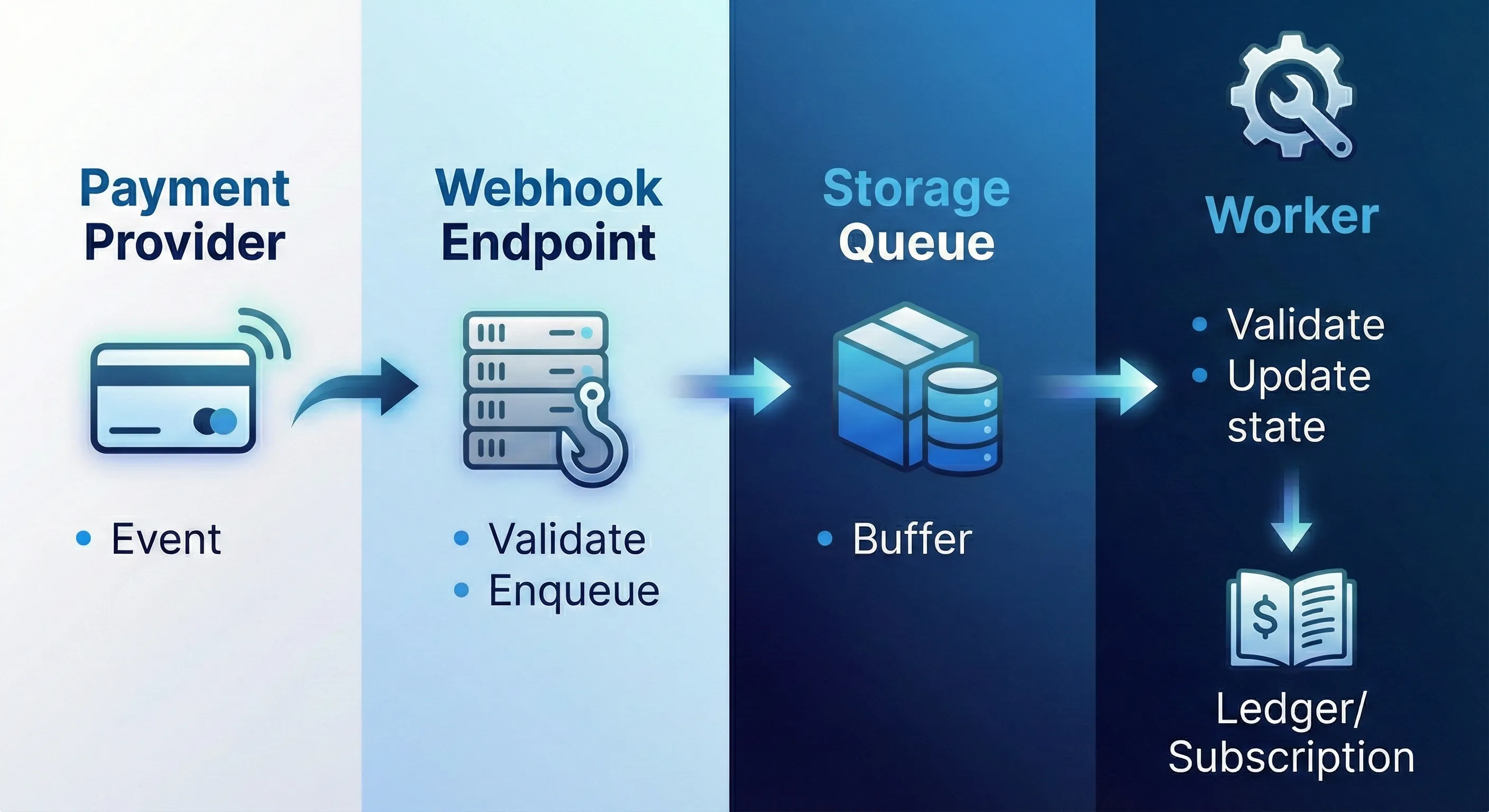
Payment provider webhook
         ↓
    Webhook endpoint (validate signature)
         ↓
    Storage Queue
         ↓
    Worker (idempotent processing)
         ↓
    Update subscription state in SQL
Idempotency is critical. Payment webhooks can be delivered multiple times. Use the event ID to deduplicate. For those not familiar with the term, idempotent processing means that processing the same event multiple times has the same effect as processing it once.
Wallet as immutable ledger
Don’t store just a balance field—store a ledger:
CREATE TABLE WalletTransactions (
    Id UNIQUEIDENTIFIER PRIMARY KEY,
    WalletId UNIQUEIDENTIFIER NOT NULL,
    Amount DECIMAL(10,2) NOT NULL,      -- Positive = credit, negative = debit
    TransactionType NVARCHAR(50) NOT NULL,
    ReferenceId NVARCHAR(200) NULL,     -- External reference (payment ID, etc.)
    CreatedAt DATETIME2 NOT NULL,
    Description NVARCHAR(500) NULL
);

-- Balance is calculated: SUM(Amount) WHERE WalletId = @WalletId
-- Or maintain a materialised balance updated transactionally
This gives you auditability and makes reconciliation possible.
Deployment and environments
Subscription strategy
For early-stage SaaS, keep it simple:
Azure Tenant (your org)
├── Subscription: saas-dev
│   ├── rg-saas-app-dev-uks
│   ├── rg-saas-data-dev-uks
│   └── rg-saas-ops-dev-uks
│
└── Subscription: saas-prod
    ├── rg-saas-app-prod-uks
    ├── rg-saas-data-prod-uks
    └── rg-saas-ops-prod-uks
Separate subscriptions per environment:
- Clear billing separation
- Blast radius containment
- Different RBAC policies per environment
Resource group organisation
Group by workload, not by “dev vs prod”:
| Resource Group | Contains |
|---|---|
rg-{product}-app-{env}-{region} | ACA apps, Functions |
rg-{product}-data-{env}-{region} | SQL, Storage accounts |
rg-{product}-ops-{env}-{region} | Key Vault, App Config, monitoring |
CI/CD with GitHub Actions
# Simplified deployment flow
name: Deploy to Production

on:
  push:
    branches: [main]

jobs:
  build-and-deploy:
    runs-on: ubuntu-latest
    steps:
      - uses: actions/checkout@v4

      - name: Build container image
        run: docker build -t ${{ secrets.ACR_LOGIN_SERVER }}/web:${{ github.sha }} .

      - name: Push to ACR
        run: |
          az acr login --name ${{ secrets.ACR_NAME }}
          docker push ${{ secrets.ACR_LOGIN_SERVER }}/web:${{ github.sha }}

      - name: Deploy to ACA
        run: |
          az containerapp update \
            --name web \
            --resource-group rg-deckfolio-app-prod-uks \
            --image ${{ secrets.ACR_LOGIN_SERVER }}/web:${{ github.sha }}
Use ACA revisions for safer rollouts—deploy a new revision, validate, then shift traffic.
Infrastructure as Code
Use Bicep or Terraform to make cost controls repeatable:
// Example: ACA with scale-to-zero
resource webApp 'Microsoft.App/containerApps@2023-05-01' = {
  name: 'web'
  location: location
  properties: {
    configuration: {
      ingress: {
        external: true
        targetPort: 8080
      }
    }
    template: {
      scale: {
        minReplicas: 0  // Scale to zero!
        maxReplicas: 10
        rules: [
          {
            name: 'http-scaling'
            http: {
              metadata: {
                concurrentRequests: '50'
              }
            }
          }
        ]
      }
    }
  }
}
Ops and residency
Regional considerations
The reference architecture assumes deployment to a single region initially. For UK-based SaaS with UK data residency requirements:
- Primary region: UK South (London)
- Paired region (DR): UK West (Cardiff), if needed later.
Azure regions to consider for other markets:
| Market | Primary region | Notes |
|---|---|---|
| UK | UK South | Good service availability |
| EU | West Europe (Netherlands) or France Central | GDPR-aligned |
| US | East US or West US 2 | Broadest service availability |
| APAC | Australia East or Southeast Asia | Depends on customer location |
Data residency checklist
If data residency matters to your customers:
- SQL Database in target region
- Blob Storage in target region (with geo-redundancy disabled or paired within region)
- Backups configured to stay in-region
- Logs and telemetry (App Insights workspace) in-region
- Document your residency posture for customer due diligence
Operational runbook basics
Even at MVP stage, document:
- How to check if things are healthy (App Insights dashboard, key metrics)
- How to restart a stuck service (ACA revision restart)
- How to replay failed queue messages (dead-letter queue handling)
- How to restore from backup (SQL point-in-time restore, blob versioning)
- Who to contact for each external dependency (payment provider support, email service)
Cost control checklist
Here’s the concrete checklist to keep costs minimal:
Compute
- ACA apps:
minReplicas: 0 - ACA apps: right-sized CPU/memory (start with 0.25 CPU, 0.5 Gi)
- Container images: multi-stage builds, small base images
- Functions: Consumption or Flex plan (not Premium unless needed)
Background processing
- Queue-triggered, not polling
- Timer triggers only for truly periodic work
- Batch operations where possible
Data
- SQL: Serverless tier with auto-pause
- SQL: Query optimisation (fewer roundtrips, projections)
- Blob: Lifecycle policies for old data
- Blob: Appropriate redundancy (LRS is cheapest)
Observability
- App Insights: Sampling enabled (start with 20%)
- App Insights: Retention set appropriately (30-90 days)
- Alerts: High-signal only, avoid alert fatigue
Governance
- Budget alerts configured per subscription
- Resources tagged for cost attribution
- Monthly cost review in calendar
- “Kill switch” process documented for runaway costs
Honest trade-offs
Let’s be upfront about what you’re accepting with this architecture:
Cold starts are real
When your app has been idle, the first request will be slower:
- ACA: 2-10 seconds depending on image size and startup time
- Functions (Consumption): 1-5 seconds
- SQL (Serverless): 5-60 seconds for first query after pause
Mitigations:
- Aggressive edge caching for common requests
- Loading states in UI
- Keep-alive pings for critical paths (but this defeats scale-to-zero)
- Premium plans if cold start is truly unacceptable (costs more)
SQL isn’t truly zero if you’re constantly poking it
Serverless SQL pauses after a configurable idle period (default: 1 hour). If your app makes a health check query every minute, it never pauses.
Design around this:
- Health checks shouldn’t hit SQL
- Batch background jobs to run together
- Accept that active development means SQL stays warm
Some costs are irreducible
No matter how clever you are:
- DNS: ~£0.50/month per zone
- Cloudflare: Free tier exists, but WAF features cost
- Storage: Existence costs money (pennies, but not zero)
- App Insights: Ingestion has a cost floor
- SSL certificates: Free via Let’s Encrypt/Cloudflare, but management overhead
For a minimal SaaS in idle state, expect £10-25/month baseline, not literally zero.
Complexity tax rises fast
Every additional service adds:
- Another thing to monitor
- Another thing to secure
- Another thing to understand when debugging
- Another thing to pay for
Start simple:
- Storage Queues before Service Bus
- Single region before multi-region
- App-level caching before Redis
- Manual processes before automation
Add sophistication only when you’ve proven you need it.
Architecture diagrams
To visualise the key flows in this architecture:
1. Request path (synchronous)
2. Async job path (background processing)
3. Webhook path (external events)
Next steps
If you’re ready to implement this architecture:
- Start with the app tier: Get a basic ACA deployment with
minReplicas: 0working - Add the data layer: Provision SQL Serverless and Blob Storage
- Implement one async flow: Pick something simple (email notification) to prove the queue pattern
- Add observability: Configure App Insights with sensible sampling
- Iterate: Add complexity only as you prove you need it
The goal isn’t perfection; and this is where a lot of people stumble when they first start thinking about building a SaaS product either on the side or as a full time solo endeavour. The goal here is really a production-grade foundation that doesn’t cost money while you’re finding product-market fit.
Summary
Scale-to-zero on Azure is achievable for SaaS products, but it requires intentional architecture:
- Separate fast from slow—queue long operations
- Event-driven by default—no idle polling
- Edge caching—reduce cold start impact
- Serverless data—SQL that can pause
- Security from day one—managed identity everywhere
- Honest about trade-offs—cold starts, baseline costs, complexity tax
The patterns in this playbook have been battle-tested on real SaaS products. They won’t make your cloud bill literally zero, but they’ll keep it minimal while you focus on what matters: building something customers want to pay for.


