Last month I published a WinUI vs WPF comparison that focused squarely on Windows desktop development. Several readers asked the obvious follow-up: what about cross-platform? If you’re building .NET UI that needs to run on more than just Windows, the two names you keep hearing are .NET MAUI and Avalonia UI. They solve the same broad problem - write C# and XAML, ship to multiple platforms - but they approach it in fundamentally different ways, and those differences matter when you’re committing a team to one or the other.
My career started out in Xamarin development, and I took part in Microsoft’s Beautiful UI challenge when they first launched MAUI, so I’ve been watching this space for a while. I keep both frameworks on the bench because I genuinely enjoy staying current with the .NET UI ecosystem. This isn’t a feature-matrix regurgitation from the docs - it’s what I’ve found building real applications with both.
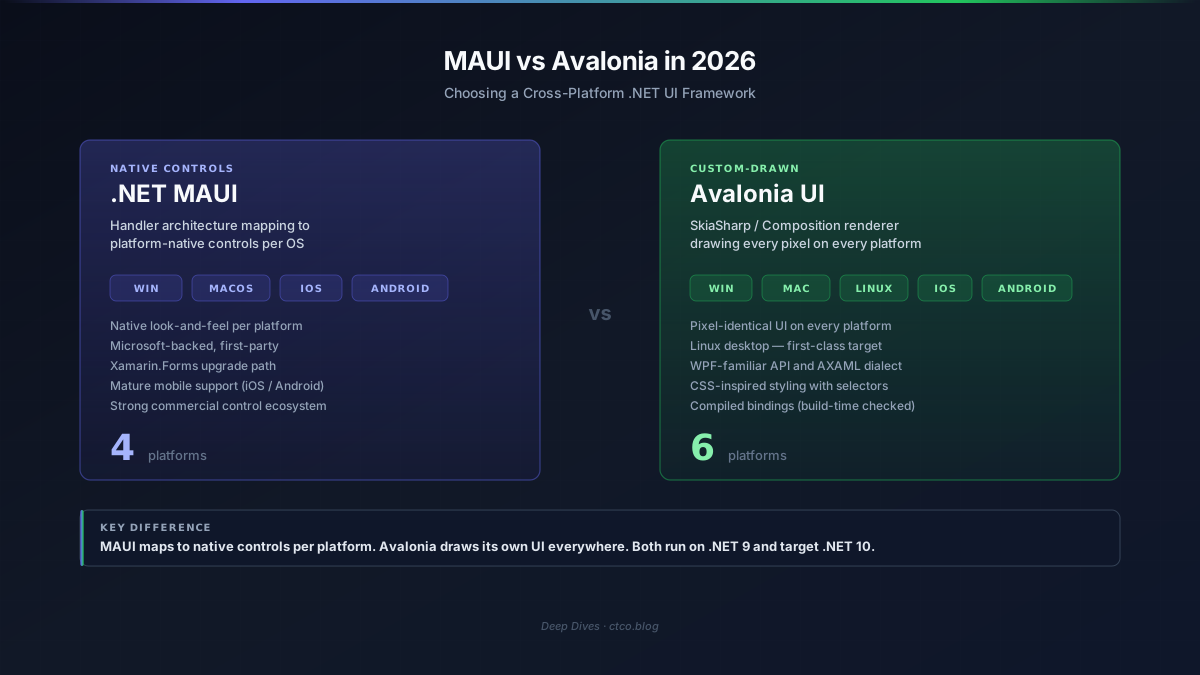
Table of contents
Open Table of contents
The State of Play in 2026
Cross-platform .NET UI has had a turbulent decade. Xamarin.Forms promised write-once-run-everywhere and delivered write-once-debug-everywhere-differently. MAUI was supposed to fix that. Avalonia emerged from the community as a WPF-inspired alternative that took a completely different architectural bet. Both have matured significantly, and the choice between them is no longer academic.
A Brief History
- Xamarin.Forms (2014) - Xamarin’s abstraction over native iOS and Android controls, later adding UWP. Acquired by Microsoft in 2016. Reached end of support May 2024
- Avalonia (2013, first stable 2023) - community-driven, open-source framework inspired by WPF’s API surface but built on a custom Skia-based rendering engine. Version 11.0 shipped in 2023 with iOS/Android support; version 11.2 stabilised mobile in late 2024; version 12 is in preview now
- .NET MAUI (2022, GA with .NET 6) - Microsoft’s official successor to Xamarin.Forms. Rough first year, stabilised substantially through .NET 7 and 8 LTS. Now shipping with .NET 9, with .NET 10 previews available
Where Each Framework Sits Today
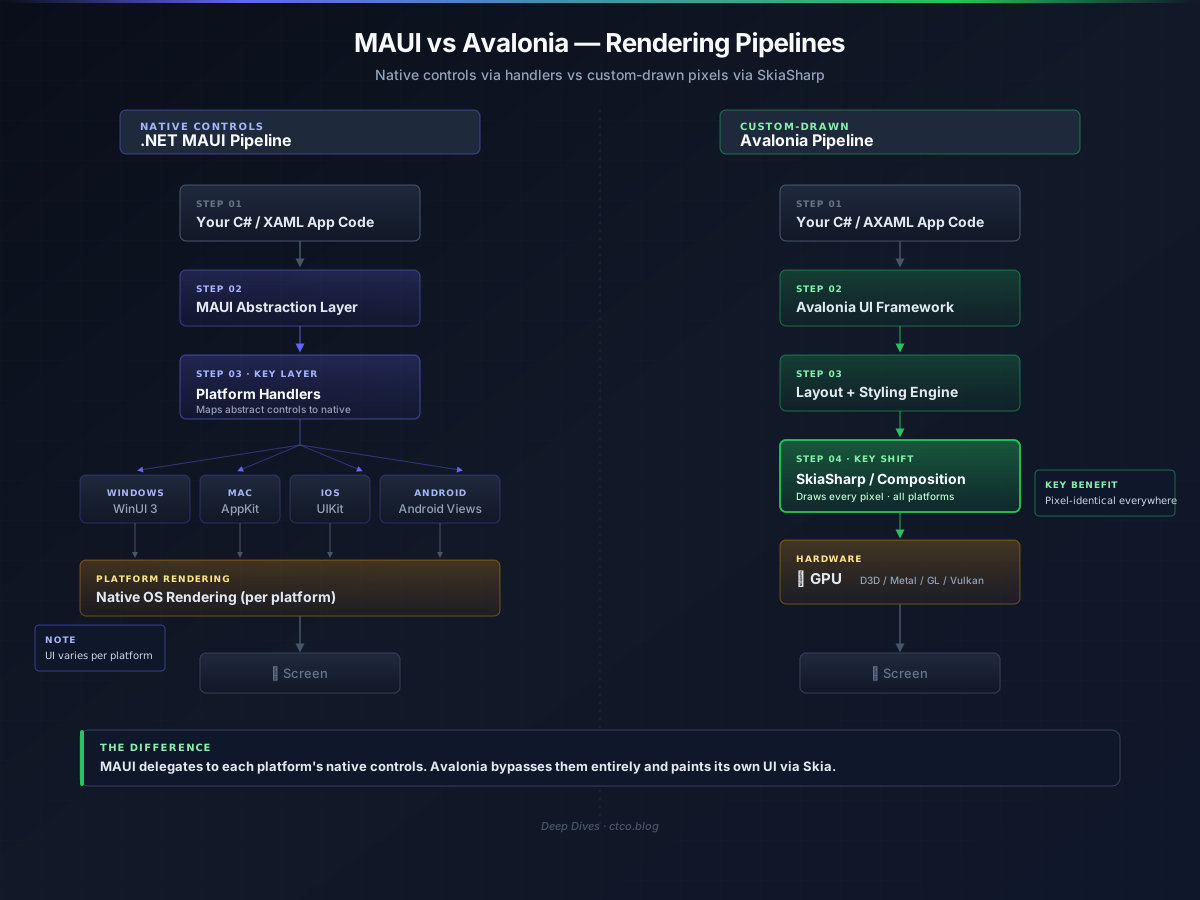
.NET MAUI is Microsoft’s first-party cross-platform UI framework, shipping as part of the .NET 9 workload and included in the .NET 10 previews. It targets Windows, macOS, iOS, and Android. The framework uses a Handler architecture (replacing Xamarin.Forms’ Renderer model) that maps abstract controls to native platform controls. On Windows, MAUI’s controls ultimately render through WinUI 3; on macOS through AppKit; on iOS through UIKit; on Android through Android Views.
Recent MAUI milestones:
- .NET 9 release (November 2025) - significant performance improvements, better trimming support, new
HybridWebViewcontrol for Blazor integration, improvedCollectionViewstability - Native AOT for iOS - now the default compilation mode for iOS builds, reducing app size and improving startup
- Improved hot reload - XAML and C# hot reload are both reliable in Visual Studio 2026 (a sentence I couldn’t write with a straight face two years ago)
- Multi-window support matured on desktop platforms
- .NET 10 preview - early access to C# 14 features, further startup improvements, and experimental Tizen support revival
Avalonia UI is an open-source, community-and-commercially-backed framework from AvaloniaUI (the company). It targets Windows, macOS, Linux, iOS, Android, and WebAssembly - the widest platform reach of any .NET UI framework. Avalonia draws every pixel itself using SkiaSharp (with a newer Composition renderer available since 11.1), meaning your UI looks identical across every platform.
Recent Avalonia milestones:
- Avalonia 11.2 (late 2024) - stabilised mobile platform support, improved gesture handling, better IME support
- Avalonia 12 preview (early 2026) - new composition-based rendering pipeline as the default, significant performance gains, improved accessibility APIs, WebAssembly improvements
- Avalonia XPF - the commercial product that lets existing WPF apps run cross-platform with minimal code changes (more on this in the migration section)
- JetBrains partnership - Rider’s Avalonia tooling is first-class, including a visual designer and XAML previewer
- Growing commercial adoption - JetBrains themselves use Avalonia for cross-platform tooling, and the framework powers several shipped products
The .NET 9 and .NET 10 Factor
Both frameworks run on .NET 9 today. MAUI ships as an official .NET workload; Avalonia is a NuGet package that targets .NET 9. Both have .NET 10 preview support.
For cross-platform developers, .NET 10 brings:
- Native AOT improvements - broader compatibility that benefits both frameworks, particularly for mobile deployment size
- C# 14 - extensions and the
fieldkeyword simplify MVVM patterns in both - ARM64 optimisations - relevant for both Apple Silicon Macs and mobile ARM devices
- Startup performance - runtime improvements that compound with each framework’s own optimisation work
The shared runtime means your business logic, services, and data access layers are identical regardless of which UI framework sits on top. The decision is purely about the presentation layer and the platforms you need to reach.
Architecture and Rendering
This is the single most important technical difference between the two frameworks, and it cascades into almost every other comparison point.
MAUI’s Handler Architecture
MAUI uses a handler pattern where each abstract MAUI control (Button, Entry, ListView) maps to a platform-specific native control through a handler class. When you write <Button Text="Save" /> in your MAUI XAML, the framework creates:
- A
WinUI 3 Buttonon Windows - An
AppKit NSButtonon macOS - A
UIKit UIButtonon iOS - An
Android.Widget.Buttonon Android
This means your app gets the native look, feel, and behaviour of each platform. A MAUI button on iOS looks and animates like an iOS button. A MAUI list on Android scrolls with Android’s overscroll physics. The trade-off is that your UI will look different on each platform - sometimes subtly, sometimes significantly.
The handler architecture is an improvement over Xamarin.Forms’ renderer pattern: handlers are simpler to write, more composable, and have better performance characteristics. But the fundamental model is the same - your abstract XAML becomes platform-specific native controls.
Avalonia’s Custom Rendering
Avalonia takes the opposite approach. It draws every pixel itself using SkiaSharp (a .NET binding for Google’s Skia 2D graphics library) or, in newer versions, a composition-based renderer that still ultimately paints its own visuals. There are no native controls in the pipeline - an Avalonia Button is rendered identically on Windows, macOS, Linux, iOS, Android, and WebAssembly.
This is the same architectural philosophy as Flutter (Dart), or Qt’s widget system (C++), or WPF itself (which also draws its own controls rather than using Win32 native controls). Avalonia’s XAML dialect is deliberately close to WPF’s, which is no accident - the framework was built by developers who wanted WPF’s programming model on every platform.
The implications:
- Pixel-identical UI everywhere - your app looks the same on a Windows laptop and a Linux workstation. For internal tools, dashboards, and branded applications, this is often exactly what you want
- No platform-specific rendering quirks - if it works on one platform, it works on all of them. You’re not debugging why a
CollectionViewbehaves differently on iOS versus Android (a classic MAUI pain point) - Doesn’t look “native” by default - an Avalonia app on macOS doesn’t use macOS native controls. It can be themed to approximate a native look, but it won’t inherit system animations, haptics, or accessibility behaviours from the platform’s native control library
Threading Models
Both frameworks use a single-UI-thread model, consistent with virtually all XAML frameworks.
MAUI uses MainThread.BeginInvokeOnMainThread() for dispatching to the UI thread. On each platform, this maps to the platform’s native dispatch mechanism - DispatcherQueue on Windows, NSRunLoop on macOS/iOS, Activity.RunOnUiThread on Android.
Avalonia uses Dispatcher.UIThread.Post() or Dispatcher.UIThread.InvokeAsync(), which is closer to WPF’s model. The compositor renderer (Avalonia 12) runs rendering on a separate thread, similar to WPF’s milcore architecture.
// MAUI - dispatch to UI thread
MainThread.BeginInvokeOnMainThread(() =>
{
    StatusLabel.Text = "Processing complete";
});

// Avalonia - dispatch to UI thread
Dispatcher.UIThread.Post(() =>
{
    StatusLabel.Text = "Processing complete";
});
The practical difference is minimal. The architectural difference underneath - native controls versus custom-drawn - is what actually affects your day-to-day development experience.
Performance Head-to-Head
The usual caveats apply: UI benchmarks are highly dependent on application complexity, device hardware, and what you’re measuring. These numbers are from my own testing with a moderately complex line-of-business application (data grids, forms, navigation, charting) targeting Windows (desktop) and Android (mobile). Desktop tests ran on a Ryzen 7 development machine; mobile tests on a Pixel 8.
Startup Time (Desktop - Windows)
| Scenario | MAUI (.NET 9) | Avalonia 11.2 |
|---|---|---|
| Cold start (first launch) | ~2.1s | ~1.6s |
| Warm start (subsequent) | ~1.1s | ~0.8s |
| With Native AOT | ~0.9s | ~0.6s |
Avalonia starts faster on desktop. MAUI’s startup includes initialising the native control infrastructure (WinUI 3 on Windows), which adds overhead. Avalonia’s Skia renderer initialises more quickly because it’s not bootstrapping a separate platform UI framework underneath.
Startup Time (Mobile - Android, Pixel 8)
| Scenario | MAUI (.NET 9) | Avalonia 11.2 |
|---|---|---|
| Cold start | ~1.8s | ~2.2s |
| Warm start | ~0.7s | ~0.9s |
On mobile, MAUI wins. It’s been optimised for mobile startup over several .NET releases, and the native control pathway is well-trodden. Avalonia’s mobile support is newer and the Skia initialisation on mobile devices carries a measurable cost.
Memory Usage (Desktop)
| Metric | MAUI | Avalonia |
|---|---|---|
| Working set (idle) | ~200 MB | ~140 MB |
| Working set (active, 10k rows) | ~370 MB | ~260 MB |
| Private bytes (steady state) | ~230 MB | ~165 MB |
Avalonia uses significantly less memory on desktop. MAUI’s overhead comes from the native control infrastructure - each native control carries its own memory footprint on top of the managed MAUI abstraction.
Rendering Throughput (Desktop, 60Hz target)
| Scenario | MAUI (fps) | Avalonia (fps) |
|---|---|---|
| Scrolling 10k row DataGrid | 48-58 | 55-60 |
| Complex layout resize | 35-50 | 52-60 |
| Animation-heavy dashboard | 50-58 | 56-60 |
Avalonia’s custom renderer maintains more consistent frame rates, particularly during layout changes. MAUI’s performance depends on the native platform’s control performance - which is generally good, but introduces variability.
The AOT Story
Native AOT matters for both frameworks, but for different reasons:
- MAUI on iOS - Native AOT is now the default compilation mode for iOS, replacing the older Mono AOT. This is a significant improvement for app size and startup
- MAUI on Android - still uses the Mono runtime with profiled AOT. Full Native AOT for Android is in preview
- Avalonia - Native AOT works on all desktop platforms (Windows, macOS, Linux) today. Mobile AOT follows whatever the underlying .NET runtime supports
For desktop deployment, both frameworks benefit from AOT. For mobile, MAUI’s AOT story is more mature simply because Microsoft has invested in it for longer.
Developer Experience
IDE Support
This is where the two frameworks diverge sharply in practice.
MAUI in Visual Studio is the first-party experience. After the painful early days (2022-2023 were rough), Visual Studio 2026 delivers reliable MAUI tooling:
- XAML designer with live preview across platforms
- XAML Hot Reload that actually works (for real this time - I say that having been burned before)
- Reliable debugging across Windows, Android emulators, and iOS via Mac build host
- Good IntelliSense for MAUI-specific XAML namespaces and controls
- NuGet package management that understands platform-specific dependencies
- C# Hot Reload for code-behind and ViewModel changes
MAUI’s tooling gap: Visual Studio Code support is limited. The official MAUI extension provides basic project management but no XAML designer or visual debugging. JetBrains Rider has MAUI support but it’s a tier below Rider’s native Android/iOS tooling.
Avalonia in JetBrains Rider is the standout experience. Rider’s Avalonia plugin provides:
- Full XAML previewer with live updates
- AXAML-aware IntelliSense and code completion
- Visual debugging and element inspection
- Cross-platform debugging without platform-specific build hosts
Avalonia in Visual Studio is functional but less polished - the XAML previewer works via a separate process, and IntelliSense is good but occasionally lags behind Rider. Avalonia also has genuine VS Code support - the Avalonia extension provides a XAML previewer and project templates that work, making it the better option if your team prefers lightweight editors.
Hot Reload
Both frameworks support XAML Hot Reload, and both have improved enormously from where they were two years ago.
MAUI’s hot reload in Visual Studio 2026 handles XAML changes, style modifications, and many code-behind changes without restarting the app. The experience is mature on Windows; on Android and iOS, there’s occasional lag after complex changes, but it’s workable.
Avalonia’s hot reload works through a separate mechanism that’s IDE-agnostic. It handles XAML and style changes reliably. Code changes require a restart, though Avalonia 12 is working on improved hot reload capabilities.
Debugging
MAUI debugging on Android and iOS goes through platform-specific channels. Android debugging via the emulator is solid; iOS debugging requires a Mac build host (physical or via a cloud service like Hetzner Mac minis), which adds setup complexity. On Windows, debugging is straightforward - it’s just a WinUI 3 app underneath.
Avalonia debugging is simpler in one respect: because the framework draws everything itself, there’s no need to debug platform-specific native control behaviour. The Avalonia DevTools window (similar to browser DevTools) lets you inspect the visual tree, modify properties live, and track binding resolution. It’s available on every platform, which means your debugging workflow is identical on Windows and Linux.
Platform Reach
This is the table most people are looking for, so let me just lay it out directly.
| Platform | .NET MAUI | Avalonia |
|---|---|---|
| Windows | ✅ via WinUI 3 | ✅ via Skia |
| macOS | ✅ via AppKit (Mac Catalyst on .NET 10) | ✅ via Skia |
| iOS | ✅ via UIKit | ✅ via Skia (stable since 11.2) |
| Android | ✅ via Android Views | ✅ via Skia (stable since 11.2) |
| Linux | ❌ No official support | ✅ via X11/Wayland + Skia |
| WebAssembly | ❌ (Blazor Hybrid, not native MAUI) | ⚠️ Preview, improving |
| Tizen | ⚠️ Community maintained, experimental | ❌ Not targeted |
The numbers tell the story. MAUI covers the four platforms most commercial applications need. Avalonia covers those four plus Linux and WebAssembly.
Linux: Avalonia’s Differentiator
If you need Linux desktop support from a .NET UI framework, Avalonia is your only serious option. Full stop. MAUI has no official Linux support - there’s a community effort (previously via Tizen, now via various experimental backends), but nothing Microsoft supports or recommends for production.
Avalonia’s Linux support isn’t a bolt-on or afterthought - it’s one of the framework’s original target platforms. X11 and Wayland backends are mature, font rendering matches the host system, and clipboard/drag-and-drop work as expected. I’ve deployed Avalonia-based internal tools on Ubuntu and Fedora workstations and the experience is solid.
For organisations with mixed desktop environments - Windows for most staff, Linux for developers or operations teams - Avalonia lets you ship one codebase to all of them.
Mobile: MAUI’s Stronger Ground
On mobile, the picture flips. MAUI’s iOS and Android support is built on years of Xamarin investment. The native control model means your mobile app inherits platform conventions - iOS navigation gestures, Android material design patterns, platform-specific keyboard behaviours, accessibility integration with platform screen readers.
Avalonia’s mobile support shipped with version 11 and has improved through 11.1 and 11.2, but it’s younger. Touch gesture handling, virtual keyboard management, and platform-specific behaviours (share sheets, in-app purchases, push notifications) require more manual work in Avalonia because you’re not sitting on native controls that provide these automatically.
If your project is mobile-first - the kind of app where most users will be on phones and tablets - MAUI’s maturity on iOS and Android is a practical advantage.
WebAssembly
Avalonia’s WASM support is in preview and works for simple to moderate applications. It’s not production-ready for complex apps yet (performance and bundle size are the main constraints), but it’s progressing. MAUI doesn’t target WASM directly - you’d use Blazor for web UI in a MAUI/Blazor Hybrid app, which is a different model entirely.
Ecosystem and Third-Party Controls
The Big Three Control Vendors
| Vendor | MAUI Support | Avalonia Support |
|---|---|---|
| Telerik | ✅ Full suite, mature | ⚠️ Limited (DataGrid, Charts) |
| DevExpress | ✅ Full suite, mature | ❌ Not available |
| Syncfusion | ✅ Full suite, mature | ⚠️ Community contributions only |
This is an area where MAUI has a clear lead. As Microsoft’s official cross-platform framework, it gets first-party attention from commercial control vendors. If your LOB application needs a feature-rich DataGrid, scheduling control, or reporting suite from a major vendor, MAUI is the safer bet.
Avalonia’s third-party ecosystem is smaller but growing. The community-driven control libraries fill many gaps:
- Actipro Avalonia UI Controls - a commercial suite with docking, editors, and navigation controls
- Dock - open-source docking/layout system
- DataGrid from the Avalonia team (built-in since 11.0)
- FluentAvalonia - Fluent Design controls and styles
- Semi.Avalonia - a comprehensive theme and control library
Shared Ecosystem
CommunityToolkit.Mvvm works identically with both frameworks. This is worth emphasising because it means your ViewModel layer - ObservableProperty, RelayCommand, source-generated MVVM patterns - is completely portable between MAUI and Avalonia:
// Works identically in both MAUI and Avalonia
public partial class MainViewModel : ObservableObject
{
    [ObservableProperty]
    private string _searchQuery = string.Empty;

    [ObservableProperty]
    private bool _isLoading;

    [RelayCommand]
    private async Task SearchAsync()
    {
        IsLoading = true;
        Results = await _searchService.QueryAsync(SearchQuery);
        IsLoading = false;
    }
}
LiveCharts2 supports both frameworks for charting. ReactiveUI works with both. Most non-UI NuGet packages (HTTP clients, serialisation, database access) are framework-agnostic by definition.
XAML Differences That Actually Matter
Both frameworks use XAML, but the dialects differ more than you’d expect from two frameworks in the same ecosystem.
Namespace and File Conventions
MAUI uses standard XAML with the .xaml extension. Avalonia uses .axaml (Avalonia XAML) to distinguish its dialect:
<!-- MAUI -->
<ContentPage xmlns="http://schemas.microsoft.com/dotnet/2021/maui"
             xmlns:x="http://schemas.microsoft.com/winfx/2009/xaml"
             x:Class="MyApp.MainPage">
    <VerticalStackLayout Padding="16">
        <Label Text="Hello from MAUI" FontSize="24" />
        <Entry Placeholder="Search..." />
        <Button Text="Go" Clicked="OnGoClicked" />
    </VerticalStackLayout>
</ContentPage>

<!-- Avalonia -->
<UserControl xmlns="https://github.com/avaloniaui"
             xmlns:x="http://schemas.microsoft.com/winfx/2006/xaml"
             x:Class="MyApp.MainView">
    <StackPanel Margin="16">
        <TextBlock Text="Hello from Avalonia" FontSize="24" />
        <TextBox Watermark="Search..." />
        <Button Content="Go" Click="OnGoClicked" />
    </StackPanel>
</UserControl>
Notice the differences beyond namespaces: Label vs TextBlock, Entry vs TextBox, VerticalStackLayout vs StackPanel, Placeholder vs Watermark, Text vs Content on Button. If you’re coming from WPF, Avalonia’s API will feel immediately familiar. If you’re coming from Xamarin.Forms, MAUI’s API is the natural continuation.
Data Binding
Neither framework offers compiled bindings comparable to WinUI 3’s x:Bind. Both use runtime reflection-based {Binding}:
<!-- MAUI -->
<Label Text="{Binding UserName}" />
<Button Text="Save" Command="{Binding SaveCommand}" />

<!-- Avalonia -->
<TextBlock Text="{Binding UserName}" />
<Button Content="Save" Command="{Binding SaveCommand}" />
Avalonia does offer compiled bindings via {CompiledBinding} or by setting x:CompileBindings="True" on a view, which provides compile-time checking of binding paths. This catches typos and refactoring breaks at build time rather than runtime - a meaningful quality-of-life improvement:
<!-- Avalonia - compiled binding (catches errors at compile time) -->
<UserControl xmlns="https://github.com/avaloniaui"
             x:CompileBindings="True"
             x:DataType="vm:MainViewModel">
    <TextBlock Text="{Binding UserName}" />
</UserControl>
MAUI has no equivalent. Binding errors in MAUI are runtime-only, surfaced through the debug output window. If you’ve read my WinUI vs WPF piece, you’ll know I consider compile-time binding verification a genuine productivity win.
Styling
MAUI uses Style resources and Visual State Manager, similar to Xamarin.Forms:
<!-- MAUI -->
<Style TargetType="Button">
    <Setter Property="BackgroundColor" Value="#6366f1" />
    <Setter Property="TextColor" Value="White" />
    <Setter Property="CornerRadius" Value="8" />
</Style>
Avalonia uses a CSS-inspired styling system that supports nested selectors, pseudo-classes, and style classes:
<!-- Avalonia -->
<Style Selector="Button.primary">
    <Setter Property="Background" Value="#6366f1" />
    <Setter Property="Foreground" Value="White" />
    <Setter Property="CornerRadius" Value="8" />
</Style>

<Style Selector="Button.primary:pointerover">
    <Setter Property="Background" Value="#4f46e5" />
</Style>
Avalonia’s styling is more powerful and flexible - the selector syntax lets you target elements by class, type, name, and state without Visual State Manager boilerplate. If you’ve worked with CSS, Avalonia’s approach feels natural. If you’re coming from WPF or Xamarin, it takes a day to adjust but then feels like an upgrade.
Controls That Don’t Map 1
| MAUI Control | Avalonia Equivalent | Notes |
|---|---|---|
CollectionView | ListBox / ItemsRepeater | Avalonia’s ListBox virtualises; ItemsRepeater is more flexible |
Shell | Router + NavigationView | No single equivalent; navigation is more manual |
SwipeView | No built-in | Implement via gesture recognition |
CarouselView | Carousel | Available in Avalonia |
RefreshView | No built-in | Common on mobile MAUI apps; not typical on desktop |
Map | No built-in | MAUI has native map integration; Avalonia needs third-party |
BlazorWebView | WebViewControl | Different model; MAUI’s Blazor integration is deeper |
TabBar | TabControl | Avalonia uses WPF-style naming |
MAUI has more mobile-oriented controls out of the box (maps, swipe views, pull-to-refresh). Avalonia has more desktop-oriented controls (docking, tree data grid, menu bars).
Deployment and Distribution
MAUI Deployment
MAUI’s deployment story is platform-specific by nature, because each platform has its own packaging and distribution model:
- Windows - MSIX packaging (default), or unpackaged via WinUI 3’s unpackaged support. Microsoft Store distribution works. Traditional MSI/EXE via additional packaging tools
- macOS -
.appbundle, distributable via Mac App Store or direct download. Code signing and notarisation required for distribution outside the Store - iOS -
.ipabundle via Xcode tooling. App Store distribution or enterprise sideloading. Requires Apple Developer account and Mac build host - Android -
.apkor.aab(Android App Bundle). Google Play distribution or direct sideloading
Visual Studio 2026 handles the packaging workflow for all four platforms, though iOS still requires a Mac in the build chain (either local or remote). The experience has improved dramatically - publishing a MAUI app to the Google Play Store is a guided wizard now, not the adventure it was in 2023.
Avalonia Deployment
Avalonia’s deployment is simpler on desktop and more manual on mobile:
- Windows - standard
.exe(self-contained or framework-dependent), MSIX optional. No special packaging required. Can also publish via Microsoft Store using MSIX - macOS -
.appbundle. Self-contained deployment with the .NET runtime bundled. Notarisation works via standard Apple tooling - Linux - native executable. Distribute via AppImage, Snap, Flatpak, or plain
.deb/.rpmpackages. This is genuinely straightforward -dotnet publishgives you a self-contained binary that runs on most modern Linux distributions - iOS/Android - follows standard .NET mobile packaging. Newer and less automated than MAUI’s tooling
Linux deployment deserves emphasis: the ability to dotnet publish -r linux-x64 --self-contained and get a working desktop application is one of Avalonia’s most compelling features for developer tooling and internal enterprise apps.
Distribution Size
| Configuration | MAUI (Windows) | Avalonia (Windows) |
|---|---|---|
| Framework-dependent | ~18 MB | ~12 MB |
| Self-contained | ~95 MB | ~75 MB |
| Self-contained + trimmed | ~55 MB | ~40 MB |
| Native AOT | ~35 MB | ~25 MB |
Avalonia produces smaller binaries because it’s not pulling in a native platform UI framework. MAUI bundles the WinUI 3 runtime (on Windows), which adds to the baseline size.
Migration Paths
Xamarin.Forms to .NET MAUI
This is the migration path Microsoft designed. MAUI is the direct successor to Xamarin.Forms, and the conceptual model carries over:
- Namespace changes -
Xamarin.Forms.*becomesMicrosoft.Maui.*. The .NET Upgrade Assistant handles most of this mechanically - Renderer to Handler migration - custom renderers need rewriting as handlers. The handler API is simpler, but it’s not a find-and-replace
- Project structure - single-project structure replaces the old platform-specific head projects
- Third-party controls - most major Xamarin.Forms control vendors have MAUI versions. Check compatibility before committing
Microsoft’s .NET Upgrade Assistant is genuinely helpful here. For straightforward Xamarin.Forms apps (standard controls, MVVM, no heavy custom renderers), I’ve seen teams complete the migration in days rather than weeks. Complex apps with extensive custom renderers take longer.
WPF to Avalonia (and Avalonia XPF)
If you’re migrating an existing WPF application to cross-platform, Avalonia offers two paths:
Standard migration - rewrite your views in Avalonia’s AXAML. Because Avalonia’s API is modelled on WPF, the conceptual translation is close: Window stays Window, TextBlock stays TextBlock, Grid stays Grid, DataTemplate stays DataTemplate. Namespaces change, some APIs differ, and the styling system is different - but a WPF developer will feel at home within a day.
Avalonia XPF (commercial licence) - AvaloniaUI’s compatibility layer that runs existing WPF XAML and code-behind on Avalonia’s rendering engine. This means your WPF app can run on macOS and Linux with minimal code changes. XPF isn’t free (it’s a commercial product with per-developer licensing), but for large WPF codebases where a full rewrite is impractical, it’s a credible path to cross-platform that didn’t exist three years ago.
WPF to MAUI
This migration is harder than either of the above. MAUI’s XAML dialect is descended from Xamarin.Forms, not WPF. Control names differ, the layout system works differently, and the programming model (particularly navigation via Shell) has no WPF equivalent. If you’re moving a WPF app to cross-platform, Avalonia is the shorter path unless your primary target is mobile.
When to Choose What
Choose .NET MAUI When
- Mobile-first - if your primary users are on iOS and Android, MAUI’s native control model delivers the platform-appropriate experience users expect
- Deep Microsoft ecosystem - if you’re already using Azure, MSAL, Microsoft Graph, and Visual Studio end-to-end, MAUI is the path of least friction
- Migrating from Xamarin.Forms - MAUI is the direct upgrade path, and the migration tooling is mature
- Commercial control dependency - if your LOB app needs Telerik, DevExpress, or Syncfusion’s full control suites
- Native look-and-feel per platform - if your app should look like an iOS app on iOS and an Android app on Android, MAUI’s handler architecture delivers this naturally
Choose Avalonia When
- Linux desktop support is required - non-negotiable differentiator; MAUI doesn’t offer it
- Pixel-identical UI across platforms - for branded apps, internal tools, or dashboards where visual consistency matters more than platform-native aesthetics
- WPF migration to cross-platform - Avalonia’s API proximity to WPF (and the XPF commercial option) makes it the shorter path
- Desktop-first with optional mobile - if your primary targets are Windows, macOS, and Linux desktops, with mobile as a secondary consideration
- Smaller deployment footprint - Avalonia’s binaries are consistently smaller
- JetBrains Rider workflow - if your team uses Rider, Avalonia’s tooling integration is stronger
The Summary Table
| Consideration | .NET MAUI | Avalonia |
|---|---|---|
| Windows support | ✅ Native via WinUI 3 | ✅ Custom-drawn via Skia |
| macOS support | ✅ Native via AppKit | ✅ Custom-drawn via Skia |
| iOS support | ✅ Native, mature | ✅ Available, newer |
| Android support | ✅ Native, mature | ✅ Available, newer |
| Linux desktop | ❌ Not supported | ✅ First-class, mature |
| WebAssembly | ❌ (Blazor Hybrid only) | ⚠️ Preview |
| Native look-and-feel | ✅ Controls inherit platform UI | ⚠️ Custom-drawn, themeable |
| Pixel-identical cross-platform | ❌ UI differs per platform | ✅ Identical everywhere |
| Desktop startup time | ⚠️ Slower | ✅ Faster |
| Mobile startup time | ✅ Faster | ⚠️ Slower |
| Memory footprint (desktop) | ⚠️ Higher | ✅ Lower |
| Native AOT readiness | ✅ iOS production, others preview | ✅ Desktop production, mobile via .NET |
| Third-party control ecosystem | ✅ Major vendors, broad | ⚠️ Growing, some gaps |
| Visual Studio tooling | ✅ First-class | ⚠️ Functional |
| JetBrains Rider tooling | ⚠️ Supported | ✅ First-class |
| VS Code support | ⚠️ Limited | ✅ Better via extensions |
| Compiled bindings | ❌ Runtime only | ✅ CompiledBinding available |
| Styling system | ⚠️ Traditional XAML styles | ✅ CSS-inspired selectors |
| WPF migration path | ⚠️ Significant rewrite | ✅ Close API, XPF for compatibility |
| Xamarin.Forms migration | ✅ Direct upgrade path | ⚠️ Full rewrite required |
| Community resources | ✅ Microsoft-backed, large | ⚠️ Smaller but active |
| Deployment size | ⚠️ Larger | ✅ Smaller |
| Microsoft backing | ✅ First-party, funded | ⚠️ Community + commercial (AvaloniaUI) |
Conclusion
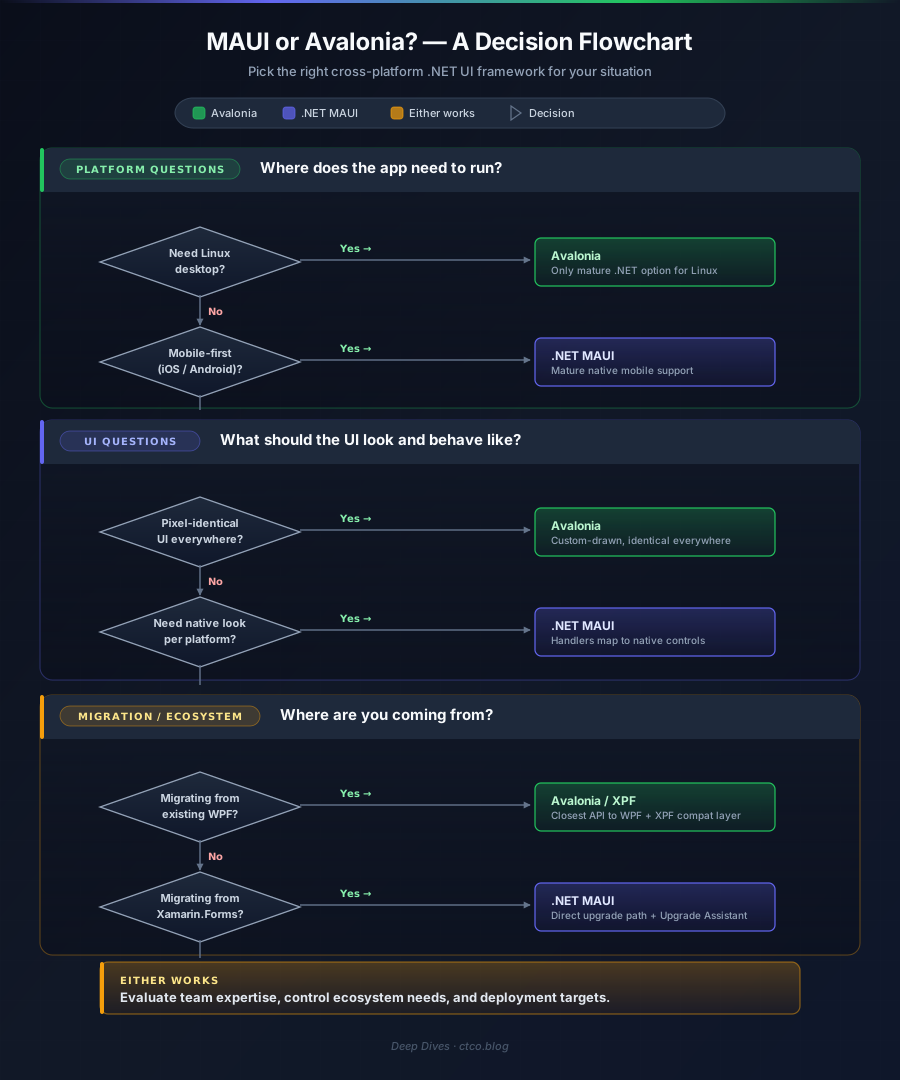
The honest answer is that these two frameworks serve overlapping but distinct audiences, and the “winner” depends on three practical questions: what platforms do you actually need, what does your app’s UI need to look like, and where is your team coming from?
If you’re building a mobile-first application that needs to feel native on iOS and Android - the kind of app where users expect platform-specific navigation patterns, gestures, and visual conventions - MAUI is the stronger choice. Microsoft’s investment, the mature mobile tooling, and the commercial control ecosystem give it a practical edge for that specific job. Migrating from Xamarin.Forms? MAUI is the obvious path.
If you’re building desktop-first or need Linux, Avalonia is the better foundation. The performance characteristics are better on desktop, the deployment story is simpler, the API is closer to WPF for teams with that background, and Linux support isn’t an afterthought - it’s a first-class target. For internal tooling, developer tools, cross-platform utilities, and branded applications where visual consistency across platforms matters more than native aesthetics, Avalonia delivers what MAUI architecturally cannot.
Both frameworks are credible production options in 2026. Both run on .NET 9, both will run on .NET 10, and both share the CommunityToolkit.Mvvm ecosystem for your ViewModel layer. The choice is about what sits above that shared foundation - and now, at least, it’s a genuine choice between two capable options rather than a compromise.
References and Further Reading
Official Microsoft Documentation
- .NET MAUI documentation - framework overview, getting started, and API reference: learn.microsoft.com/dotnet/maui
- What’s new in .NET MAUI for .NET 9 - HybridWebView, CollectionView improvements, trimming support: learn.microsoft.com/dotnet/maui/whats-new/dotnet-9
- Migrating from Xamarin.Forms to .NET MAUI - official migration guide and upgrade assistant: learn.microsoft.com/dotnet/maui/migration
- .NET Upgrade Assistant - tooling for Xamarin.Forms to MAUI migration: learn.microsoft.com/dotnet/core/porting/upgrade-assistant-overview
Avalonia Documentation
- Avalonia UI documentation - framework overview, tutorials, and API reference: docs.avaloniaui.net
- Avalonia XPF - commercial WPF compatibility layer for cross-platform deployment: avaloniaui.net/xpf
- Avalonia 11 release notes - iOS/Android support, compiled bindings, and composition renderer: avaloniaui.net/blog
GitHub Repositories
- .NET MAUI - issue tracker, feature requests, and source code: github.com/dotnet/maui
- Avalonia - source code and issue tracker: github.com/AvaloniaUI/Avalonia
- CommunityToolkit.Mvvm - MVVM source generators for both frameworks: github.com/CommunityToolkit/dotnet
Community and Third-Party
- FluentAvalonia - Fluent Design controls and styles for Avalonia: github.com/amwx/FluentAvalonia
- LiveCharts2 - cross-framework charting with MAUI and Avalonia support: github.com/beto-rodriguez/LiveCharts2
- Telerik UI for .NET MAUI - commercial control suite: telerik.com/maui-ui
- Actipro Avalonia UI Controls - commercial control suite for Avalonia: actiprosoftware.com/products/controls/avalonia
Previous Coverage
- WinUI vs WPF in 2026: A Practical Comparison - my Windows desktop framework comparison that this post builds on: ctco.blog/posts/winui-vs-wpf-2026-practical-comparison

